 GlockApps
An invoice leaves your accounting software. A customer says it never arrived. Your newsletter appears to be sending normally, but enquiries have slowed down. Someone suggests changing SPF, buying a warm-up service or removing a few words from the subject line.
The difficulty is not finding advice. It is working out which advice applies to the email you actually sent.
GlockApps is interesting because it puts several kinds of evidence together: inbox-placement tests, spam-filter results, authentication checks, IP and domain information, DMARC reporting and ongoing monitoring. That combination can help you move beyond “it must be the spam filter” and investigate a particular sending service.
It is not a tool that guarantees delivery. It does not make every customer mailbox behave like its test mailboxes, and a subscription does not automatically repair your email setup. Its value depends on whether the information helps you make a better decision.
This review examines the current public product pages, setup instructions, help articles, pricing and contractual information. It is a research-based assessment, not an account of a personal production trial. The workflow descriptions below explain the documented product; they are not invented experiences of running campaigns or receiving support.
The short verdict
GlockApps is worth considering when you need repeatable evidence about how an email is handled across different providers, particularly if you also want authentication and reputation information in the same investigation.
It makes most sense for a business that sends important campaigns, an agency looking after several clients, or an administrator trying to distinguish a sending-system problem from a recipient-specific issue. You need someone who can interpret the results and act on them. That person does not necessarily have to be you, but they do need access to the relevant email platform or domain administrator.
The strongest argument for GlockApps is the breadth of its diagnostic workflow. The strongest argument against buying it immediately is that your particular problem may have a simpler answer. A mistyped recipient address, a failed contact-form connection or a clear server rejection should be investigated directly before you pay for broader testing.
My recommendation is to begin with a non-sensitive test through the service you are concerned about. Assess the usefulness of the resulting evidence before choosing a recurring subscription. Paying for an attractive dashboard is not the same thing as buying a clearer explanation.
What GlockApps actually does
The product is better understood as a collection of related tools than as one universal email score.
Inbox Insight tests an email against seed mailboxes and spam-filtering environments. A seed mailbox is an account used for testing, rather than a real subscriber on your customer list. The report brings together placement, authentication, IP and domain analysis, content checks and suggested action steps.
DMARC Analytics receives and interprets reports about the use of your domains. Its purpose is to show sending sources and authentication outcomes that would otherwise be buried in XML reports. This is useful for understanding which services use your domain and whether their messages meet DMARC requirements.
Uptime Monitor checks records and availability-related conditions. The documentation describes SPF, DKIM and DMARC monitoring, IP blocklist monitoring, and checks relating to websites and mail servers. These answer different questions from an inbox-placement test.
There are also integrations, API access and consulting services. Some of these can reduce routine work; others introduce additional permissions, costs or implementation decisions.
Keeping those distinctions in mind makes the product much easier to evaluate. If you only need to read DMARC reports, do not judge value by the number of campaign-testing features. If your priority is campaign placement, do not assume a green DNS monitor proves that campaign will reach the inbox.
Inbox placement is the main reason to look beyond a DNS checker
A DNS checker can tell you whether a record exists and whether its syntax looks plausible. It cannot tell you where a particular campaign appeared in a Gmail or Outlook test mailbox.
Inbox Insight addresses that second question. You send the message to the test environments, and GlockApps reports what it finds. Its product material describes inbox, spam and sub-folder placement, alongside provider-level results.
That is useful because a headline average can hide the problem you need to investigate. A test that looks acceptable overall may show weak results at a provider that matters disproportionately to your business. Conversely, a poor combined result may reflect providers that make up very little of your audience.
Consider a UK consultancy sending most of its proposals to Microsoft-hosted businesses. Its administrator should inspect the relevant Microsoft results, not choose a fix simply because an overall percentage changed. A retailer whose permission-based list includes many personal Gmail addresses has a different weighting problem.
These are examples of how to interpret evidence, not claims about customer outcomes. GlockApps does not know your audience mix merely because it can test several providers. You still need to bring knowledge of your customers and sending services to the report.
The benefit is a more focused investigation. Instead of asking whether “email deliverability” is good or bad, you can ask which provider, sending identity, message or IP is associated with the change.
How reliable is a GlockApps test?
There are two separate questions here: whether the tool observes its seed accounts accurately, and whether those observations predict the experience of every customer.
GlockApps says it checks the test mailboxes directly. Its help article describes default mailbox filters and a cold audience without prior engagement, and calls the result accurate for its seed list. That is the vendor's description of its measurement method, not independent proof that a report forecasts all recipient inboxes.
The company's longer seed-testing guide makes the boundary clearer. A real recipient may have opened your previous messages, replied to you, added you to contacts or developed a relationship with your domain. Seed accounts do not reproduce all those individual relationships.
This explains why your own mailbox can show an email in the inbox while a seed test shows spam. Neither observation necessarily cancels out the other. They describe different receiving circumstances.
The current guide says a full test uses 150 seed addresses selected from its pool, with coverage across 40 unique mailbox providers. It also says the exact selection can vary and that users can select a smaller set. Those are current published specifications, not a promise that every test, plan or future seed list will be identical.
Treat the report as evidence from controlled receiving environments. Use it alongside sending logs, bounce notices, provider-specific information and genuine recipient observations. That is more valuable than deciding the product is either infallible or useless because one personal mailbox behaved differently.
Provider coverage matters more than an impressive total
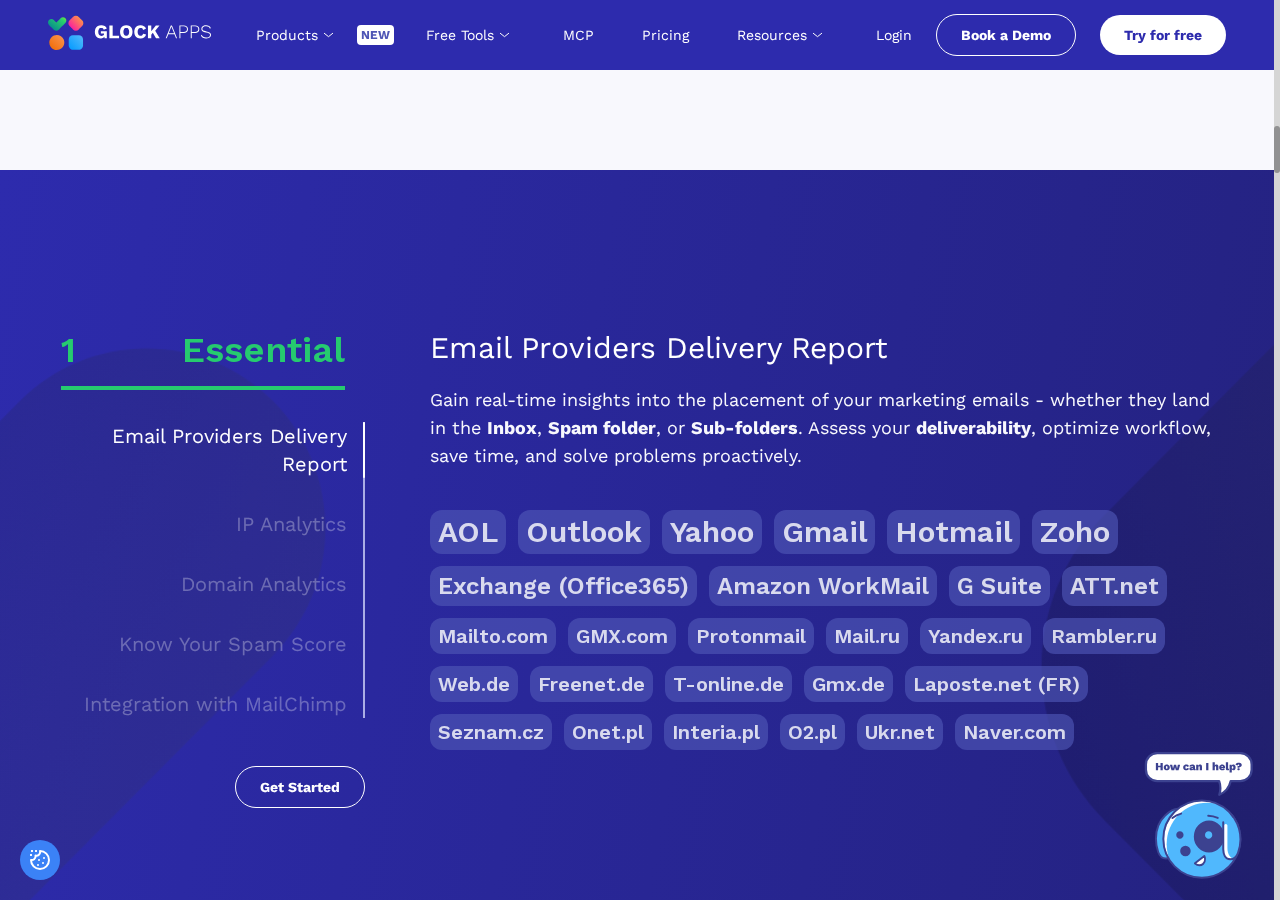
The public Inbox Insight page lists both consumer and business environments, including Gmail, Outlook, Yahoo, Zoho, Exchange/Office 365 and other providers. Its breadth is part of the appeal.
However, more seed addresses do not automatically make a test more relevant to your business. You should check which environments are included, how your plan handles selection and what the results mean for the domains you actually send to.
Business email deserves particular care. One organisation's Microsoft 365 tenant can use different security products, rules and quarantine policies from another. Testing an environment labelled Microsoft or Exchange is useful, but it does not reproduce every customer's administrator decisions.
The same applies to a campaign that reaches a tab or another folder. A folder classification is not identical to rejection, and a server accepting a message does not establish that someone read it. Those distinctions affect the next action you take.
Before paying, write down the providers that matter most to your recipients. Ask whether the current test coverage gives you useful visibility into them. This is a much better buying question than asking only how many addresses appear in the seed list.
If the tool covers the environments you need and makes their results easy to separate, the breadth is an advantage. If it does not answer your particular provider question, the large total becomes less important.
Manual testing: the best starting point
Manual tests are the most straightforward way to understand the product's purpose. You create a test and send the email you want to investigate to the supplied test addresses.
The current product instructions describe accessing a manual test in your account, choosing the testing options, sending the message and inspecting the resulting report. Identification requirements matter: use the instructions generated for the specific test, rather than relying on an old copied seed list.
For a newsletter, the important point is to send through the same campaign platform that will send the real message. A copy sent from your personal mailbox tests your personal mailbox's route instead.
For accounting software, a website form or a booking system, reproducing the route may take more planning. Some platforms allow a controlled notification to test recipients; others require help from the administrator. Do not assume changing the visible From address recreates the original service.
Use non-sensitive content. Keep the structure, links and sending route relevant to the problem without including a customer's invoice, confidential attachment or live account-reset token.
A useful first test has a specific purpose: investigate one message, one service and one concern. Once you understand the report, repeat under similar conditions if a comparison is needed. This produces a much clearer baseline than changing DNS, content and platform settings together and then celebrating a better score.
What the report can add to a support conversation
The report is potentially useful even when you are not the person authorised to fix the setup.
A business owner can collect a test result, the affected message type, the date, the sending service and a genuine bounce notice, then pass those to the IT contact. That is more actionable than “customers say our email is unreliable”.
GlockApps describes deliverability information, content analysis and action steps in its reports. The value is in relating those observations to an actual business message. A flagged authentication identity, provider-specific placement issue or questionable link can give an administrator a sensible starting point.
The weakness is that suggestions can still be misunderstood. An action step is not permission to change shared DNS records without understanding who else uses them. A domain may send staff mail, marketing messages and automated invoices through different services.
The person reviewing the report should distinguish observed results from a suggested explanation. Where a result could have several causes, gather more evidence before making a change.
This is also why a report should accompany a short written account of the problem. Say whether the recipient received a bounce, found the message in spam, had it quarantined, or could not find it after acceptance. Those are different events, and GlockApps cannot reconstruct the full recipient-side story from a seed test alone.
Spam scores and content checks: useful clues, not a writing formula
Inbox Insight's current material describes testing against five filtering systems: SpamAssassin, Barracuda, Microsoft Exchange Online Protection, Proofpoint and a Google filter. It also describes checks involving links, images and HTML.
A collection of filter results is more informative than a single unexplained score. Different systems can react differently to the same message. The useful question is which rule or condition was flagged and whether it is relevant to your sending environment.
Do not turn that into a ritual of deleting every supposedly dangerous word. A message's handling involves more than wording, and a score should not override a clear authentication failure or a sending-platform rejection.
Content analysis is particularly useful when something has changed: a new template, a different tracking domain, a broken image reference or an unfamiliar redirect. GlockApps' automatic-test instructions describe following redirected links and checking destination domains against specified domain lists, while excluding the unsubscribe link from that checking workflow.
That gives you concrete things to inspect. It does not establish that every flagged link is malicious or that removing a flag guarantees inbox placement.
The right response is to understand the finding. If an expected link is broken, repair it. If a tracking domain appears in a warning, investigate its ownership and reputation. If a score moves without a clear reason, repeat the controlled test and compare the detailed results instead of rewriting the whole campaign impulsively.
IP and domain analysis: especially useful when several services share a brand
GlockApps describes IP analytics showing sending-chain information, Sender Score and blocklist-related findings. Its product page also mentions reverse DNS and HELO information for the primary IP, plus domain analytics and DKIM alignment-related visibility.
Those details can be useful when a business assumes that all email bearing its name uses the same infrastructure. Staff messages might leave Microsoft 365, newsletters a marketing platform, and invoices an accounting service. Their transport and authentication identities can differ.
Seeing the identities involved in a test can help an administrator connect a reported issue to the responsible provider. It may also show that two messages thought to be comparable were not sent through the same route.
The limitation is control. If the sending IP belongs to a shared platform, your business may not be able to change it, repair its reverse DNS or resolve its reputation directly. The action may be to raise a supported case with the provider, not edit your domain until a warning disappears.
Similarly, a blocklist entry needs context. Which list is involved? Is the relevant recipient provider using it? Is there a matching rejection or a broader placement pattern? The report is a prompt to investigate, not proof that one listed condition explains every missing message.
For agencies, this distinction prevents a common reporting mistake: presenting every warning as the client's fault. Some findings belong to the infrastructure provider, and some may not explain the current incident.
Automatic tests: good for monitoring, with a real credit cost
Automatic testing is one of GlockApps' more useful documented capabilities. You connect an authorised sending account, choose a message and receiving environments, then configure a schedule.
The tutorial lists connections for Outlook, Gmail/Google Workspace, Klaviyo, HubSpot and Custom SMTP. It explains that the integration needs permission to send on behalf of the account. Broader product material lists additional services, so confirm the exact connection method for your platform rather than assuming every name has the same integration.
A recurring test can help you spot changes between campaigns or after an approved configuration update. The documentation describes selectable intervals, report history and alert conditions, including provider-specific inbox-rate thresholds.
But automation is not free simply because it runs unattended. The tutorial explicitly states that every automatic run consumes a credit, including completed, stopped or failed runs. The help article also says automatic tests count towards the available balance.
For a small business, that makes scheduling a buying decision. A test frequency should match the consequence of missing a problem and the likelihood that the chosen message remains representative. A daily test of an unchanged mailbox is not automatically the right arrangement for a finance service that is never exercised by that connection.
Start with a useful schedule, review whether the results produce actionable changes, and avoid paying for repetitive data that nobody reads. The report history is valuable only when someone has responsibility for responding to a meaningful pattern.
Why “missing” does not always mean permanently lost
This is one of the most important details in the help documentation.
GlockApps explains that an automatic-test alert uses the results available when the alert is generated. A receiving provider may not yet have delivered a message, or the product may not yet have found it in the test mailbox. At that moment the result can appear as missing.
The tutorial also says some missing results can be added later when the messages reach the accounts. The report therefore deserves another look before you turn an early notification into a permanent failure claim.
The seed-testing guide separately advises checking sending logs, bounces and rejections when results are missing. Taken together, the sensible interpretation is that you need to establish what happened, not assume one cause from the label.
An alert can be useful because it tells you to look. It is not a complete incident diagnosis. Check whether the platform sent to the relevant address, whether a server deferred or rejected it, and whether the final report changed after the initial notification.
The automatic-test tutorial gives a suggested waiting interval for alerts, but that should not be treated as a universal promise of completion. Your sending route and receiving environment still matter.
For a support case, save both the initial observation and the later result with their times. That can distinguish an ongoing placement problem from a delay or an incomplete early snapshot.
Smart Tests: less seed-list administration, not identical routing by magic
Smart Tests use a proxy address. You send a message to that address, and GlockApps distributes it to the selected seed environments through the connected mailbox, according to the current tutorial.
The attraction is obvious: you do not need to maintain and paste a full test list into every message. The same proxy can be reused, and the documentation describes regenerating it when needed.
The trade-off is that convenience must not distract from the sending route. A message arriving at a proxy and then being sent through a connected mailbox needs to represent the system you actually want to assess. If it does not, the resulting report answers a different question.
This matters for shared IPs, platform-specific transformations and transactional services. Do not assume that forwarding a campaign into a smart-test workflow faithfully reproduces every original header, delivery condition or infrastructure decision. Check the documented integration and seek clarification when the original platform is central to the problem.
Each message sent to the proxy creates a new test and consumes a credit under the help documentation. A proxy address should therefore be treated as a testing resource, not scattered publicly or placed indiscriminately into automated workflows.
Smart Tests can be a good convenience feature for repeated, authorised testing. Manual tests remain a sensible baseline when you need to establish precisely what travelled through a particular sending service.
DMARC Analytics: a different view of the same business
A seed test asks what happened to a selected message in selected receiving environments. DMARC Analytics asks what reporting receivers observed about mail using your domain.
That distinction makes the combination useful. An organisation can identify a placement concern in a test and separately inspect whether legitimate services are authenticating and aligning consistently in its DMARC reports.
GlockApps' documentation describes adding the appropriate reporting destination to a domain's DMARC record and viewing parsed reports in the account. Its privacy policy lists sending IPs, source services, authentication outcomes, domain compliance information and published policy among the data involved.
For a business owner, the benefit is not having to make sense of raw XML before having a useful conversation. For an administrator, it is a way of spotting legitimate services that were forgotten, unexpected sources that need investigation, and changes in observed authentication.
There are important limits. Reports are supplied by participating receivers, so they are not a complete account of every email sent everywhere. A report is not a recipient's inbox screenshot. An unknown IP is not automatically safe to authorise simply because it appears repeatedly.
If a newsletter platform fails alignment, identify the expected signing or envelope domain and configure that platform correctly. Do not weaken policy or add every observed source to SPF just to increase the pass percentage. The tool makes the evidence easier to inspect; it does not remove the need for careful ownership and change control.
Authentication passes are not an inbox guarantee
This is the technical boundary that should appear in any credible GlockApps review.
SPF checks an SMTP sending identity, commonly associated with the envelope sender. DKIM validates a signature for a signing domain. DMARC connects authenticated identifiers to the domain in the visible From address through alignment.
A DMARC pass requires at least one aligned passing SPF or DKIM identifier, not necessarily both. A receiving provider's operational requirements may ask you to configure both mechanisms, which is a separate question from the DMARC pass rule itself.
None of those results establishes that every recipient wants the message, that its content is safe, or that it belongs in the inbox. A green authentication report is useful evidence, but filtering decisions continue beyond it.
That means GlockApps should not be sold as a DNS-based shortcut to customer attention. It can help identify broken or unexpected authentication, but a legitimate campaign still needs appropriate recipients, responsible sending practices and a reason for people to engage.
For ordinary business mail, a passing test also does not invalidate a customer's account of a missing invoice. Their administrator may need to investigate security quarantine, mail rules or routing.
The practical benefit of combining authentication and placement information is that you can avoid confusing those layers. The product is most useful when it helps you separate them, not when every result is compressed into one reassuring badge.
Uptime and blocklist monitoring: useful housekeeping, not another placement score
The Uptime Monitor documentation describes checks for authentication records and IP blocklists, alongside HTTP, TCP and TLS-related availability checks.
This is worth understanding because an existing record can change, become unavailable or no longer match the intended setup. A recurring check can draw attention to a condition you would otherwise notice only after a user complains.
The help article says system-created free authentication monitors operate every two hours. It also describes paid arrangements for different intervals or additional monitoring. That article is older than some of the current product material, so verify your actual monitor options rather than treating its timing as a guarantee for every account configuration.
Automatic monitor creation is described as dependent on the DMARC information received. It should not be assumed that adding a domain immediately creates every useful check with no further configuration.
The important limitation is that record availability and syntax are not the same as successful signing or receiver-side authentication on a live email. A published DKIM key does not prove the sending platform used it for the message being investigated.
Treat uptime alerts as one layer in your maintenance process. When something changes, compare the intended records, contact the responsible administrator and retest the affected service. A healthy website check and a clean blocklist result do not certify that a newsletter reached its readers.
Google Postmaster integration: valuable when you actually have data
GlockApps advertises an integration with Google Postmaster Tools, making domain data available alongside its other reporting.
This can be useful for a team already entitled to view that information. It reduces the need to move between dashboards and can help connect a placement pattern with Google's own signals.
However, the underlying data still has Google's scope. Postmaster Tools describes messages sent to personal Gmail accounts, not every Google Workspace business mailbox and not all recipient providers. It also requires domain verification for the data to be displayed.
Do not buy the integration because you assume it creates reputation data that would otherwise be absent. A small business with little relevant traffic may not obtain the visibility it expects. Ask what the integration will display for your domain and which account permissions are involved.
The product page promotes retaining domain information longer than Google's default period. That is a potential convenience, but it also makes retention and access questions worth asking. What data is stored, what happens after cancellation, and who in an agency account can access a client's information?
Used with a clear understanding of its coverage, the integration is a useful complement to seed testing. Used as a substitute for understanding Gmail-specific data, it risks making a limited signal look broader than it is.
Integrations, reports and agency work
GlockApps' public material describes mailbox integrations, Mailchimp-related testing, PDF report export, white-label reporting and custom seed addresses. Those are relevant features for agencies and teams that need to share findings rather than merely view them.
A report can give a client a concrete account of what was tested and what changed. White labelling may fit an agency's communication process, but it does not turn vendor-generated recommendations into the agency's independent diagnosis.
There is also a cost and permission detail in the Mailchimp integration that is easy to miss. GlockApps' privacy policy describes creating a separate seed-list audience, importing the test addresses and creating a test campaign. It warns that the additional subscribers may affect the Mailchimp pricing tier.
The policy includes advice about resolving an audience-limit error. I would not remove a real audience merely to make a test integration work. Check the account's existing limits, pricing and data consequences with the platform administrator before connecting it.
Plan access needs particular care. The product page groups features under Essential, Growth and Enterprise headings, but that is not a substitute for an exact entitlement list at checkout. For an agency, confirm users, connected accounts, exports, custom seeds and client organisation explicitly.
These capabilities can make GlockApps easier to incorporate into an existing service. They are not a reason to skip the practical question of whether the agency can produce repeatable, properly scoped tests for its clients.
API and AI features: useful automation, with an access decision attached
GlockApps' current API material says API access is available on all plans, including free accounts, and describes retrieving results and running tests programmatically. It also promotes connecting AI assistants to the service.
For a technical team, the useful part is the ability to build a repeatable workflow around real report data. You might retrieve recent results, compare provider patterns or integrate selected information into an internal dashboard.
That does not mean everyone should connect an AI assistant on the first day. An API key is a credential. Automated requests can access information or trigger activity, and testing may consume credits. Protect the key through appropriate secret handling rather than putting it into a public prompt, website or shared document.
The privacy policy says GlockApps does not send customer data to AI services on its own initiative or use it to train AI models. It describes an optional Send to AI feature and connecting an assistant through its MCP server. Those are vendor policy statements; the selected external provider's terms still matter.
The relevant buying question is whether automation reduces a real task and can be configured with acceptable permissions. If your team only runs an occasional manual test, API access is a useful option rather than an immediate requirement.
Automating the collection of evidence can be helpful. Automating DNS changes in response to an interpretation is a separate, much riskier decision and is not something I would recommend as a default workflow.
GlockApps pricing: read the billing period before comparing plans
The public pricing page checked for this review displayed annual billing with a monthly equivalent. That distinction matters more than the large number beside each plan.
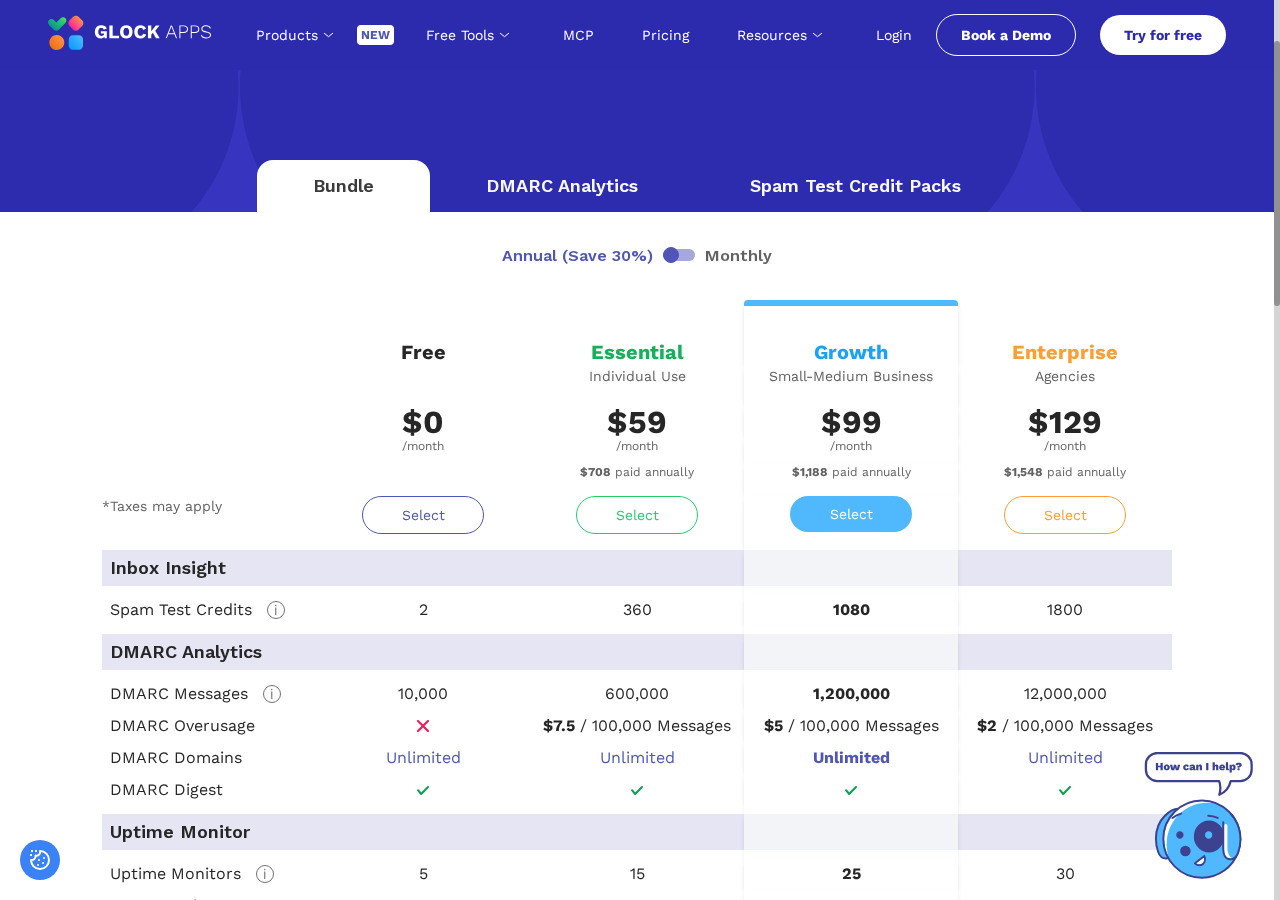
The annual bundle displayed Essential at $59 per month, with $708 paid annually; Growth at $99 per month, with $1,188 paid annually; and Enterprise at $129 per month, with $1,548 paid annually. The free option displayed $0. The page also stated that taxes may apply.
These are the annual figures observed on 13th October 2026, not verified month-to-month subscription prices. The monthly selector did not provide a dependable alternative view during this research, so I have not filled the gap using old comparisons or assumed a price from the advertised discount.
For a UK business, check the final billed currency, tax treatment and any bank conversion charge before buying. A dollar-denominated price is not a fixed pound cost, and an annualised monthly figure is not the amount charged each month.
The pricing page also provides separate DMARC and test-credit options. Choosing a bundle merely because it appears prominent may be unnecessary if you only need occasional testing.
Start with your requirement: tests, users, monitoring, domains and reporting volume. Then check the current entitlement and billing period. A plan name such as Growth or Enterprise tells you how the vendor positions the package; it does not establish which package is right for your business.
Credits, quotas and occasional use
The credit rules deserve their own section because they change the value calculation.
GlockApps' help article says one message sent to a full or partial seed list counts as one test. Reducing the list does not make that message a fraction of a credit. Automatic runs and messages sent through a proxy count against the balance as well.
It also says unused subscription credits do not roll into the next month. Because annual allocations and current packages require precise interpretation, confirm how your particular subscription distributes and expires its credits. Do not assume an attractive annual total can be used in any pattern you choose.
For occasional testing, the separate pack page displayed three credits for $16.99, ten for $47.99, and twenty for $75.99. The listed validity periods were one, two and three months respectively. Taxes may apply, and these are dated observations rather than permanent offers.
Expiry matters if you only test before a few important campaigns. A larger pack can have a lower unit cost while still being a poor purchase if the credits expire unused.
Monitoring quotas also matter. The annual bundle table includes DMARC-message allowances and overusage charges. A domain count labelled unlimited does not make processing volume unlimited.
My buying advice is to calculate expected usage before paying, then check the definition of a billable message and the overusage rules with GlockApps. Parts of its public explanations use different wording for DMARC reports and messages, so those should not be treated as interchangeable units.
Cancellation, refunds and the annual commitment
The legal notices describe cancelling a subscription through the account. They state that cancellation stops automatic renewal while the subscription continues through its applicable billing period, subject to the terms.
That is different from an unconditional refund promise. The published monthly refund wording depends on the last paid month's resources not having been used. The annual refund wording includes recalculation using the standard monthly rate for the time already used, counting complete and partial months, and deductions for non-refundable processing fees.
The consequence is that leaving an annual plan early should not be assumed to produce a simple pro-rata return of the discounted annual payment. The terms say no refund is issued if the calculation is zero or negative.
I would read those provisions before choosing annual billing, especially while still establishing whether the workflow fits the business. A discounted commitment can be sensible after the value is demonstrated; it is less attractive when the main question is whether anyone will interpret the reports.
There is also a stated distinction between an operational service-level target and a financial guarantee. The legal page does not make every missed target eligible for service credits or a refund.
This is not an allegation about poor service. It is a buying boundary. The terms determine the commitment, not the impression created by a reassuring testimonial or a prominent percentage-saving label.
Privacy, permissions and retention: not a browser-only checker
GlockApps processes testing data on its own infrastructure. Its privacy policy describes collecting sending addresses, IPs, message content, headers and placement information for Inbox Insight.
That makes a controlled test very different from reading an email header locally. If you send a real confidential message to seed accounts, its contents have left your ordinary business workflow. Use synthetic messages unless you have a specific authorised reason to do otherwise.
The policy identifies storage on AWS in the US East, Northern Virginia region. Its data-processing agreement addresses international processing and transfer arrangements, including contractual clauses and a UK addendum where applicable. Those documents are useful due-diligence material, not a substitute for your organisation assessing its own obligations.
Retention is more complicated than one headline number. The policy describes twelve-month retention for Inbox Insight reports and certain message materials, but also says message headers are retained for thirty days. The overlap in its wording about message materials and headers warrants clarification if long-term header access matters to you.
It also distinguishes paid and free DMARC retention, XML-file retention and shorter alert windows. After cancellation, the policy says a paid account converts to a limited free account. Do not assume every historic report and feature remains available in the same way.
For agencies, resolve access, client authorisation, deletion and retention before connecting a client's mailbox. These are ordinary responsibilities when using a service that receives message data, not optional paperwork added after the technical work.
What I see as the genuine advantages
Several evidence layers can be investigated together. Placement, filtering, authentication, content and infrastructure findings can support a more coherent investigation than disconnected screenshots from unrelated tools.
Manual testing provides a practical starting point. You can assess one important message before designing an ongoing monitoring arrangement. That helps keep the purchase tied to a real task.
Recurring tests make comparison possible. A documented schedule and report history can expose changes that an occasional one-off test would miss, provided the message and sending route remain representative.
DMARC reporting extends visibility beyond selected seed messages. It offers another view of legitimate and unexpected domain use, which is particularly useful when several business services share the same brand domain.
There are options for occasional and more technical use. Credit packs, integrations, reporting features and API access address different workflows. The range is useful when those options match an actual requirement.
These are advantages of the documented design. They are not independently measured savings or promises that your next campaign will generate more sales. The advantage becomes real when a finding helps you identify the responsible service, avoid a mistaken change or notice a repeatable problem sooner.
For that reason, I would judge GlockApps by the decisions it enables, not by how much information appears in a report.
The drawbacks and questions I would resolve before buying
It is not a complete reproduction of your audience. Seed accounts provide defined receiving environments. They cannot represent every subscriber relationship or business security configuration.
Someone must interpret the findings. The product can collect useful evidence without making the next action obvious to a non-technical owner. You may still need an administrator or specialist.
Automatic testing consumes resources. Failed or stopped runs can still cost a credit under the tutorial, so a poorly chosen schedule or broken integration can spend the balance without providing useful monitoring.
The public material needs careful reading. Some help articles are older than the current sales pages, and feature descriptions do not always establish exact plan entitlements. Monthly pricing, retention details and billable DMARC units deserve confirmation where they affect the purchase.
Testing introduces data-handling obligations. Messages, headers and connected-account permissions are not trivial details when client information or regulated data is involved.
A tool is not the same as a managed fix. Consulting is separately described, and I have not measured response times or the quality of support. Do not buy a subscription expecting an undocumented level of hands-on remediation.
None of those automatically rules the product out. Together, they explain why a careful initial test and a few specific pre-sales questions are preferable to an immediate annual commitment based on the headline feature list.
Who should use GlockApps, and who should wait?
A marketing team preparing important permission-based campaigns has an obvious use case: test relevant messages, inspect provider patterns and compare changes without confusing opens with placement.
An agency or managed IT provider can also benefit if it has a repeatable process for sending, interpreting and documenting tests. The value is weaker if it simply exports reports full of warnings without explaining ownership or next steps.
A small business owner can use the evidence with an IT contact. The owner should not be expected to interpret every authentication identity alone. Choose the workflow around who can act, not around who happens to hold the payment card.
I would wait if the immediate issue is already clearly explained by a bounce notice, a recipient-address error or a sending failure in the application logs. Deal with that specific failure first.
I would also wait if there is no authorised person to review the results, no suitable non-sensitive test message, or no clarity about what the product will tell you that your current tools cannot.
A worthwhile trial has a question attached. For example: is the issue isolated to one provider, does the affected service authenticate as expected, or has a controlled message's placement changed over time? If you cannot name the question, a subscription may be premature.
GlockApps alternatives: compare the job, not just the price
The closest alternative depends on the part of GlockApps you need.
SendForensics advertises placement testing, content analysis, DMARC and reputation-related monitoring, making it relevant to a broad diagnostic comparison. MXToolbox Delivery Center emphasises reputation, authentication, DMARC and placement, which is particularly relevant to infrastructure-focused investigations.
MailerCheck combines list verification with content and placement testing. Bouncer's Deliverability Kit, ZeroBounce's wider suite and Emailable's deliverability offering also deserve attention rather than being dismissed as list cleaners.
MailReach combines testing with warm-up, while Folderly's current suite separates placement testing, monitoring and other functions into named products. Compare the diagnostic modules against the work you need done; do not assume warm-up is an equivalent replacement for investigating a broken sending route.
For more advanced teams, Validity Engage, Inbox Monster and MailMonitor are additional comparison candidates. Their scope, support arrangements and packages should be examined before making a cost comparison with an individual GlockApps plan.
If you only need DMARC monitoring, specialists such as DMARC Digests, dmarcian, EasyDMARC or URIports may be more focused. If you need to repair website/application sending infrastructure, a service such as Postmark, SMTP2GO or Mailtrap addresses a different layer altogether.
These are category comparisons based on published capabilities. Without controlled testing and exact package verification, it would be misleading to declare one universally more accurate, faster or better value.
A sensible first-test checklist
Before registering, write down the affected message and the service that sends it. Include the exact symptom: a bounce, a server rejection, spam placement, quarantine or an accepted message the recipient cannot find.
Confirm who controls the platform and DNS. Save the current configuration without putting passwords, private keys or API credentials into the review notes or a support screenshot.
Prepare a non-sensitive message that represents the route and content structure. Use the documented test instructions and keep seed addresses separate from real customer metrics.
When the report is ready, inspect the provider breakdown before the overall number. Check authentication and sending identities, then relate any content or reputation findings to the problem you started with.
If results are missing, check sending logs and the later report. Do not treat an early alert as the final explanation. If your provider owns the relevant infrastructure, involve its support team with the specific evidence.
Make an agreed change only after identifying its consequences. Repeat a comparable test and record what changed. If the question is resolved by that limited workflow, you may not need continuous monitoring.
If it exposes a useful ongoing risk, then consider a schedule and a plan that can sustain it. This sequence keeps the buying decision connected to demonstrated usefulness rather than to the size of the feature table.
Frequently asked questions
Is GlockApps free?
The current public offer includes two free spam tests without a credit card requirement, and the pricing page displays a free bundle. Check the available account allowances before assuming the free option provides an unlimited monitoring service. It is a useful way to examine a limited workflow, not a promise of permanent access to every paid feature.
Can GlockApps tell me why an email went to spam?
It can provide placement observations and diagnostic clues involving authentication, filters, content and infrastructure. Those can narrow an investigation. They do not necessarily establish one definitive cause for a real recipient's handling decision, especially when that recipient's history or business security policy differs from the seed environment.
Does GlockApps fix deliverability automatically?
Testing and monitoring collect evidence; they should not be confused with an automatic repair of all sending services. GlockApps separately advertises consulting. Confirm what support is included and which changes remain your administrator's responsibility before buying.
Can I test Microsoft 365 and Google Workspace email?
The documented automatic-test integrations include Outlook and Gmail/Google Workspace, and the product lists relevant receiving environments. Verify the specific sending connection and test coverage you need. A receiving-environment result is not a replica of every organisation's custom security configuration.
Is GlockApps an email warm-up tool?
The core offer examined here is diagnostic testing, DMARC analysis and monitoring. Do not treat it as interchangeable with a service selling synthetic engagement. The seed-testing guide says its seed accounts do not artificially generate opens, clicks or replies to reproduce recipient engagement.
Can it test transactional messages?
The automatic-test guide discusses transactional and triggered messages. The useful test must still represent the affected sending route. Connecting a staff mailbox does not automatically validate an accounting platform, website application or separate notification service.
Should I buy an annual plan immediately?
Not solely because the advertised monthly equivalent is lower. Establish the workflow's usefulness, check resource limits and read the refund calculation first. Occasional test packs or the free starting offer may be a more proportionate way to investigate fit before committing.
Final verdict: buy clarity, not a guarantee
GlockApps earns a place on the shortlist because its documented tools connect several useful kinds of evidence. It can help a business stop arguing about whether something “looks like spam” and begin examining the actual sending route, receiving provider, authentication results and changes over time.
The limitations are just as important. Seed placement is not the entire audience. Authentication is not an inbox guarantee. An alert is not a complete diagnosis, and a subscription is not an undocumented promise of hands-on repair.
For a business with important campaigns or repeatable email problems, the sensible next step is a controlled test, not a speculative DNS change. If the report gives you information that your team can use, GlockApps may justify an ongoing place in your process. If a simple bounce explanation or existing provider tool already answers the question, save the subscription money.
Start with the message that matters, send it through the right service, and judge the product by whether the results make your next decision clearer.