A customer calls. "Did you just email me asking for payment to a new bank account?" You didn't. Or your inbox fills up overnight with bounce messages for emails you never sent. Or a supplier forwards you something that's clearly fake, but it's got your name all over it.
Someone is sending emails from your domain. Or at least, it looks that way.
Here's what most people don't realise in the panic: "someone is sending emails from my domain" can mean at least five completely different things. Some mean your account has been hacked and you need to act within minutes. Others mean a criminal is pretending to be you without touching any of your systems at all. And one common version isn't really an attack on you, it's just junk bouncing back to the wrong place.
Treat them all the same and you'll waste time on the wrong fix. This guide helps you work out which one you're facing, then shows you exactly what to do for each.
First: Five Situations That All Look Like "Someone's Using My Domain"
- Your account has been hacked. A criminal has logged into a real mailbox and is sending from it.
- Exact-domain spoofing. The email claims to be from you@yourdomain, but was sent from a server you don't control.
- Display name spoofing. The email looks like it's from you because the display name says "Your Business", but the actual address is something else entirely.
- A lookalike domain. The email comes from yourbuisness.co.uk or yourbusiness-uk.com, a different domain designed to fool people.
- Backscatter. You're receiving bounce messages for emails you didn't send, because a spammer forged your address as the sender.
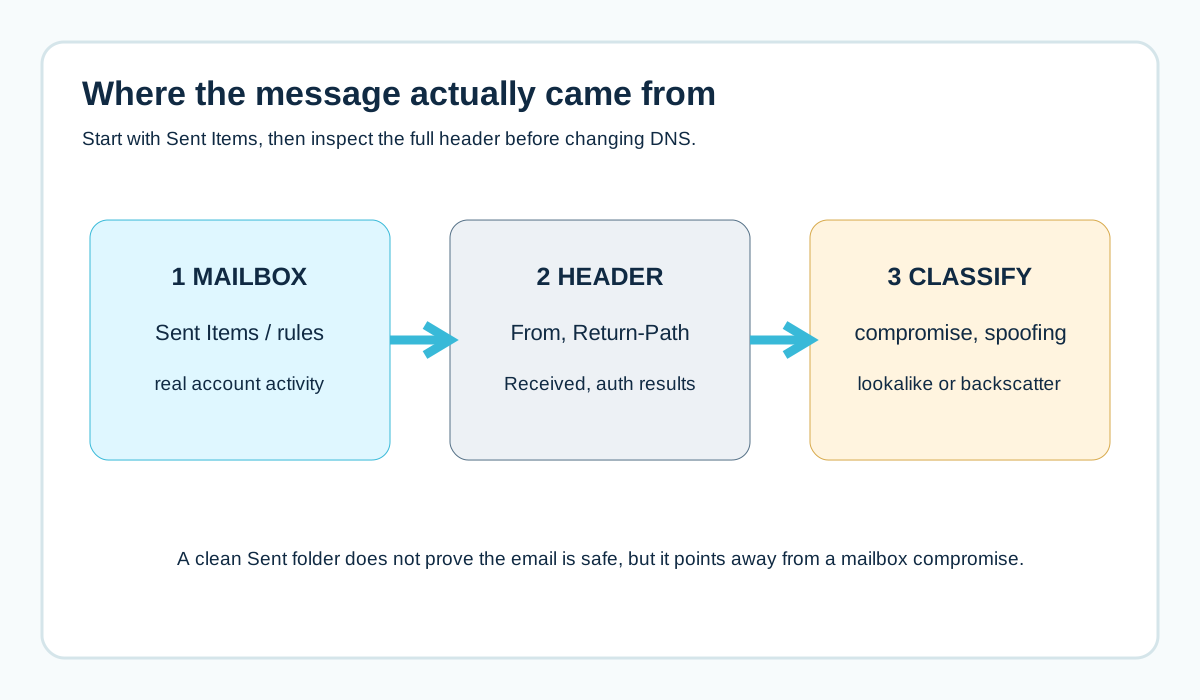
Step 1: Check Sent Items (the Urgent Test)
Log in to the mailbox that's supposedly sending the emails. Look at:
- Sent Items for messages you don't recognise
- Deleted Items (criminals often delete what they send)
- Inbox rules that forward, move or delete messages
- Recent sign-in activity, if your email provider shows it
If you find unfamiliar sent emails or strange rules, the account is very likely compromised. Skip straight to the "hacked account" section below.
If Sent Items is clean, the emails probably didn't come from your systems. Read on.
The guide to signs your business email has been hacked covers what to look for in more depth.
Step 2: Get a Copy of the Suspicious Email
Ask the person who received it to send you the full email headers, or forward it as an attachment. A normal forward often strips the most useful details.
In the header, look at:
- The actual From address (not just the display name)
- The Return-Path
- The Authentication-Results line: SPF, DKIM and DMARC results
- The Received lines (which servers it passed through)
Google explains how to view full headers in Gmail. How to read email headers walks you through what each line means.
Situation: Your Account Has Been Hacked
If emails are in your Sent Items that you didn't send, act immediately:
- Change the password for that account to a strong, unique one
- Sign out of all sessions, if your provider allows it
- Turn on two-factor login (multi-factor authentication) if it isn't already on
- Check and remove any inbox rules or forwarding you didn't set up
- Check for unfamiliar connected apps or delegates
- Warn your contacts that recent emails from that account may be fraudulent, especially anything about payments
- Tell whoever manages your IT, and consider whether other accounts are affected
If payments may have been redirected, contact your bank straight away.
Situation: Exact-Domain Spoofing (Someone Forging Your Address)
The email claims to come from accounts@yourbusiness.co.uk, but the headers show it was sent from a server you don't use, and SPF, DKIM and DMARC fail.
This is exactly what DMARC exists to stop. Check your DMARC record:
dig +short TXT _dmarc.yourbusiness.co.uk- No record at all? Receivers have no instructions about what to do with forged mail. Publish one.
- p=none? You're only monitoring. Receivers aren't asked to block forgeries.
- p=quarantine or p=reject? Receivers are asked to junk or block forged mail. Most spoofed copies should be caught (though receivers can apply their own judgement).
If you're at p=none or have no record, this is your signal to move towards enforcement. But do it carefully, so you don't block your own legitimate senders. See the DMARC setup guide and how to move from p=none to p=reject.
Situation: Display Name Spoofing
The email says "From: Your Business Ltd" but the actual address underneath is something like yourbusiness.accounts@freemailprovider.example.
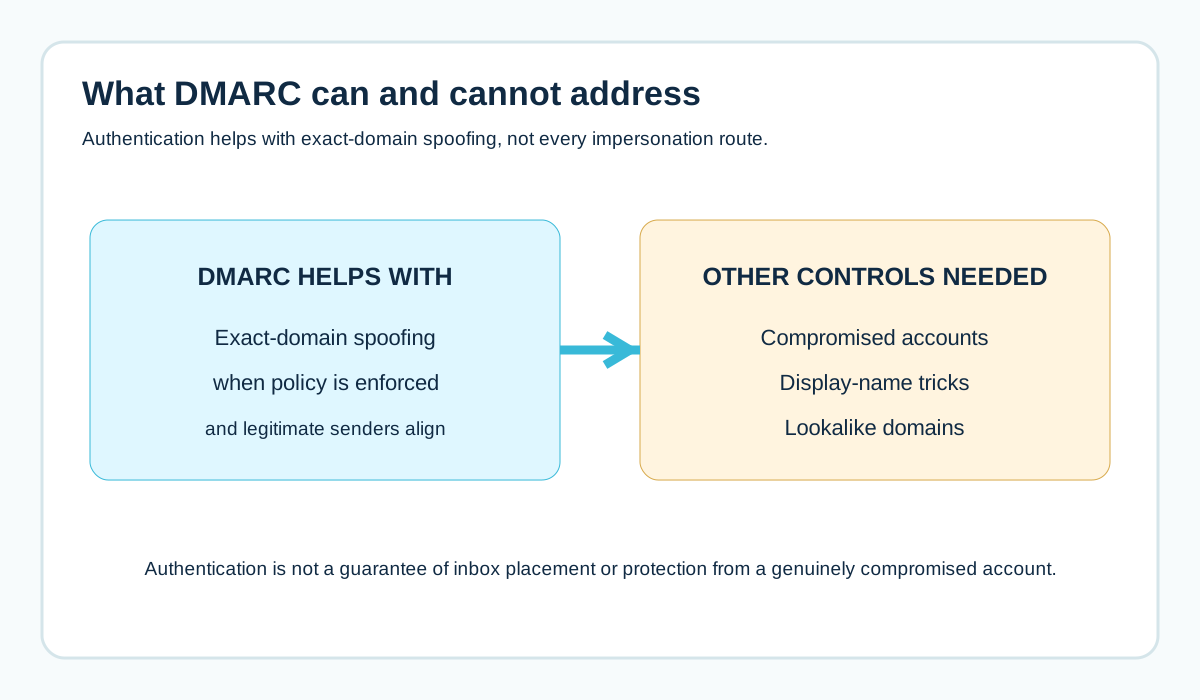
Your domain wasn't used at all. That's why DMARC doesn't help here: it protects your domain, and this email didn't use it.
What you can do:
- Warn customers and suppliers that you'll only ever email from your own domain
- Tell them to check the actual address, not just the name (on mobile, tapping the sender name usually reveals it)
- Report the account to the email provider it came from, if possible
Situation: A Lookalike Domain
The email comes from a domain that looks like yours but isn't: a swapped letter, an extra hyphen, a different ending.
Again, DMARC on your real domain can't stop this, because it's a different domain owned by someone else.
What you can do:
- Report the email (see the reporting section below)
- Warn customers and suppliers
- Consider registering obvious variations of your domain yourself, and protect them with restrictive records (see how to protect a parked domain)
- If you have legal or brand protection advice available, ask about takedown options
Situation: Backscatter (Bounces for Emails You Didn't Send)
Your inbox fills with "Undeliverable" or "Delivery failed" messages for emails you never sent.
What's usually happening: a spammer sent junk to lots of addresses and forged your address as the sender. When some of those messages bounced, the bounces came back to you.
It's annoying, but it doesn't mean your account was hacked, and it doesn't mean the spam came from your systems.
What helps:
- Check a few bounces. The original message is often attached. Confirm it didn't come from your servers.
- Make sure your SPF, DKIM and DMARC are set up, so receivers can recognise the original spam as forged and reject it
- Move DMARC towards p=reject once your own senders are aligned, so fewer forged messages are accepted in the first place
- Use your email provider's filtering to manage the bounce flood while it lasts
Backscatter usually dies down on its own once the spam run ends.
Report It (It Helps More Than You'd Think)
In the UK, you can forward suspicious emails to the Suspicious Email Reporting Service run by the National Cyber Security Centre, at report@phishing.gov.uk. The NCSC's phishing guidance explains how it works.
If money has been lost or a fraud has happened, report it to Action Fraud, the UK's national reporting centre for fraud and cybercrime.
And report phishing to the email provider it came from (Gmail, Outlook.com and others have reporting options).
Warn Your Customers Without Scaring Them
If customers have received fake emails in your name, a short, calm message helps:
Subject: Please ignore suspicious emails using our name

We've been made aware of fraudulent emails pretending to be from
[Business Name]. We will never ask you to change bank details by
email. If you receive a request to pay a new account, please call
us on [known number] before paying anything.

Our genuine emails only come from addresses ending @yourbusiness.co.uk.
Send it from your normal, authenticated address. And make sure the phone number is one customers already know, not a new one.
Prevent It Happening Again
- Turn on two-factor login for every mailbox, especially finance and directors
- Publish DMARC and move it towards p=reject once every legitimate sender aligns
- Protect domains you own but don't use for email
- Agree a rule with customers and suppliers: bank detail changes are always confirmed by phone
- Keep an eye on DMARC reports for unusual sending sources
See how to spot a fake invoice email with changed bank details for a payment verification process you can adopt.
Read the Header in 60 Seconds: Which Situation Is It?
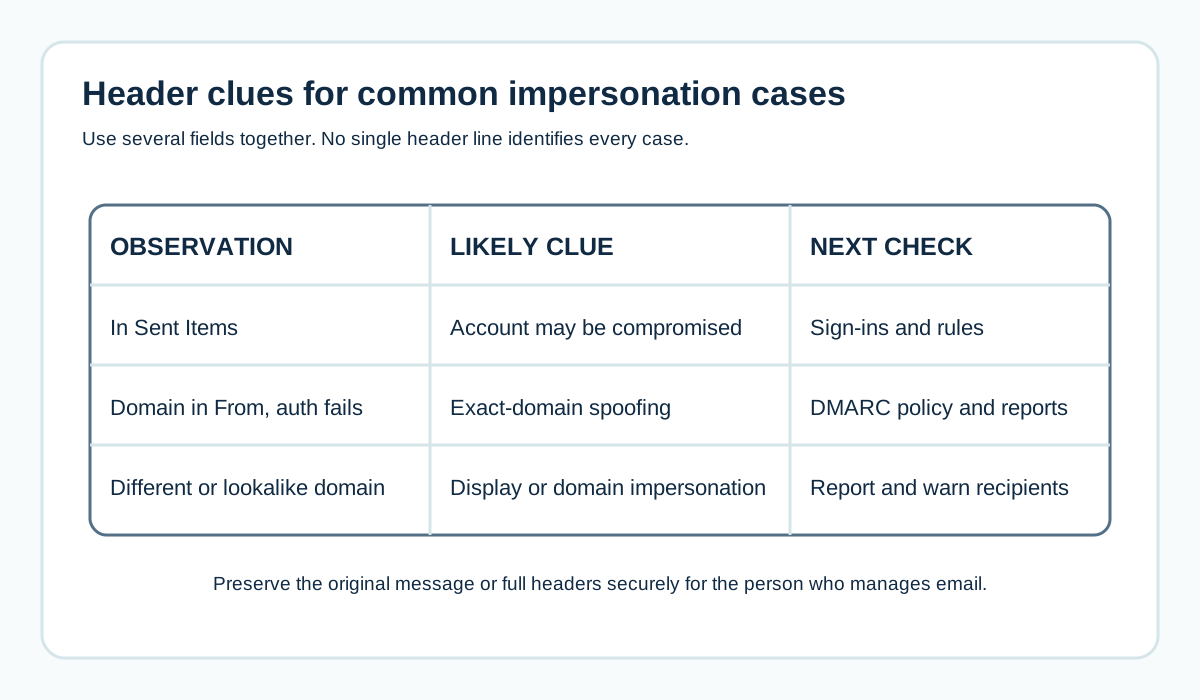
What you see in the header                         Most likely situation
In your Sent Items, passes SPF/DKIM/DMARC          Your account is compromised
From your domain, SPF/DKIM/DMARC all fail          Exact-domain spoofing
From address is NOT your domain, name says yours   Display name spoofing
From a domain that looks like yours but isn't      Lookalike domain
A bounce containing an email you never sent        Backscatter
It won't cover every case, but it points you in the right direction fast.
A Worked Example: Monday Morning Panic
A fictional Bristol recruitment agency arrives on Monday to a flood of bounce messages and two calls from clients asking about "your email about updated payment details".
They split the problem:
- The bounces: original messages attached are pharmacy spam the agency never sent. Sent Items is clean. That's backscatter from someone forging their address.
- The payment emails: a client forwards one. It's from accounts@theiragency-uk.co.uk, a lookalike domain registered last week.
Neither involves a hacked account. But the agency's DMARC was at p=none, so forged copies of their real domain were also getting through to some recipients.
What they did:
- Warned all clients that bank details are never changed by email
- Reported the lookalike domain and the phishing emails
- Reviewed their DMARC reports, confirmed every legitimate sender aligned and moved to p=quarantine, then p=reject
- Registered two obvious variations of their domain and protected them
The backscatter faded within days. Forged copies of their real domain were now being rejected.
If Customers Paid a Fake Invoice in Your Name
This is distressing for everyone. Handle it calmly and quickly:
- Tell the customer to contact their bank immediately and report it to Action Fraud
- Confirm in writing that the request didn't come from you
- Check your own mailboxes for compromise, in case the criminal got details from your systems
- Review whether your invoices clearly state that bank details are never changed by email
- Keep records of everything, in case of later questions about liability
Getting advice from your insurer or a legal adviser may be sensible, depending on the amounts involved.
What Your DMARC Reports Will Show During a Spoofing Attack
If you receive DMARC aggregate reports, spoofing attempts show up as rows where:
- The source IP isn't one of your known sending services
- SPF fails (the server isn't authorised)
- DKIM is missing or fails
- DMARC fails
At p=none, the "disposition" column will usually show none (nothing was done). At p=quarantine or p=reject, you'll see receivers taking action.
Sudden spikes in failing volume from unfamiliar sources often line up with a spoofing campaign. They're also a useful signal to tell customers and suppliers to be extra careful for a while. See how to read DMARC reports.
Can You Stop Lookalike Domains Being Registered?
Not entirely. Anyone can register an available domain. But you can reduce the risk:
- Register the most obvious variations of your domain yourself (common typos, .com and .co.uk versions, hyphenated versions)
- Protect each one with a deny-all SPF, a rejecting DMARC policy and a null MX
- Monitor for new lookalikes if impersonation is a serious risk for your business (some security services offer this)
- Tell customers clearly which domain you use
You can't buy every possible variation, so focus on the ones a busy customer might genuinely mistake for yours.
Frequently Asked Questions
Can someone send email from my domain without hacking me?
Yes. Without DMARC enforcement, anyone can forge your domain in the From line. DMARC at quarantine or reject asks receivers to block those forgeries.
Why am I getting bounce backs for emails I didn't send?
Usually backscatter: a spammer forged your address, and bounces from their spam came back to you. It doesn't necessarily mean you were hacked.
Will DMARC stop all spoofing?
It stops exact-domain spoofing of your From address when enforced. It doesn't stop display name tricks, lookalike domains or emails sent from a genuinely compromised account.
How do I know if my account was hacked or just spoofed?
Check your Sent Items, inbox rules and sign-in activity. Unfamiliar sent emails or rules point to a compromise. A clean Sent folder points to spoofing.
Where do I report a phishing email in the UK?
Forward it to report@phishing.gov.uk (the NCSC's Suspicious Email Reporting Service). Report fraud or financial loss to Action Fraud.
What is backscatter?
Bounce messages you receive for emails you didn't send, because a spammer forged your address as the sender.
Should I change my email address if it's being spoofed?
Usually not. Spoofing can happen to any address. Protect your domain with DMARC enforcement and secure your accounts instead.
Can I find out who is spoofing my domain?
Usually not with certainty. DMARC reports show the sending IP addresses, which can help with reporting, but those are often compromised machines or hired servers.
Is display name spoofing illegal?
Impersonating a business to commit fraud is a crime. Report fraudulent emails to the NCSC's reporting service and any financial loss to Action Fraud.
Will customers' spam filters catch fake emails in my name?
Many will, especially if your domain has DMARC at enforcement. Display name spoofing and lookalike domains are harder for filters to catch, which is why customer awareness matters too.
How often should I check for spoofing?
Reviewing DMARC reports monthly is a good habit. Look for unfamiliar sources and spikes in failing volume.
Should I tell my bank if my domain is being spoofed?
If customers may have been tricked into paying fake accounts, yes, and encourage affected customers to contact their own banks quickly.
Does a spoofing attack mean my website was hacked?
Not necessarily. Spoofing doesn't require access to any of your systems. Check your accounts anyway to rule out compromise.
Sources and further reading
Related reading
- Signs your business email has been hacked
- What is DMARC?
- How to protect a parked domain