Your emails arrive fine in Gmail. They arrive fine at most businesses. But send to someone using Outlook.com or Hotmail, and they vanish into the Junk folder.
If you're asking "why are my emails going to junk in Outlook?", the first thing to realise is that "Outlook" isn't one thing. It might mean a person's free Hotmail or Outlook.com account. It might mean a company's Microsoft 365 mailbox, with its own administrator and its own filtering rules. Or it might just mean the Outlook app on someone's laptop, which could be connected to any email service at all.
Each of those has a different reason for junking your mail, and a different fix.
This guide helps you work out which "Outlook" you're dealing with, what you can fix on your side, what you can't, and the one header line that tells you which problem you actually have.
First, Which "Outlook" Is Junking Your Email?
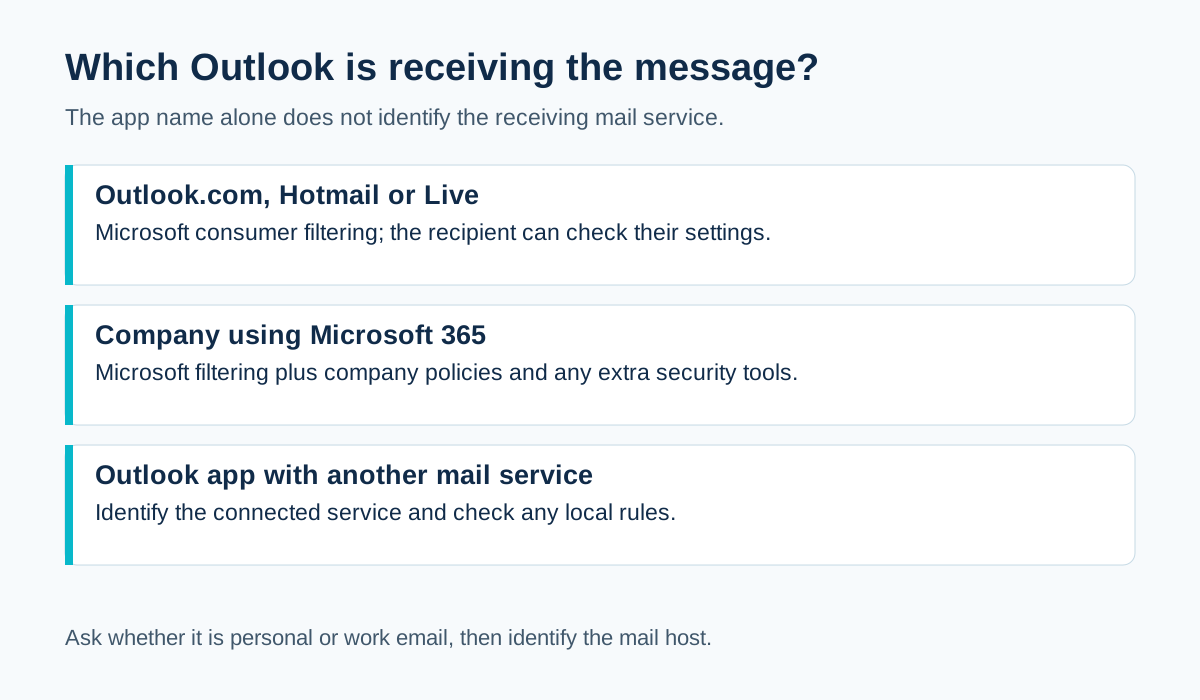
When someone says "it went to junk in Outlook", it could be any of these:
- A personal Outlook.com, Hotmail or Live account. Microsoft's consumer email service, filtered by Microsoft.
- A business using Microsoft 365. The company's email runs on Microsoft, but its IT admin can add extra rules, quarantine settings and third-party security tools.
- The Outlook app connected to something else. Someone using the Outlook desktop app to read Gmail, or their company's non-Microsoft email. The app can have its own junk settings too.
Ask the recipient what their email address ends in, and whether it's personal or work email. That one question saves a lot of guessing.
One Email to Junk vs Every Email to Junk: Very Different Problems
Before investigating, work out the scale:
- One person, one occasion: probably their personal settings or history
- One person, every time: possibly their rules, or their organisation's filters
- Lots of Outlook.com and Hotmail users: likely your authentication, reputation or sending patterns
- Everyone, everywhere: a broader problem with your setup
Don't change DNS records because of one person's junk folder. Do investigate seriously if lots of Microsoft consumer users are affected.
Check Your Authentication on a Real Email to Outlook.com
Create a free Outlook.com account (or use one you already have). Send it a normal email from your business, through the same system that's having problems.
Then view the message headers. In Outlook.com, open the message, look for the option to view message details or message source (the exact menu name changes from time to time). Microsoft's guide to viewing internet message headers has current steps.
Look for the Authentication-Results line. You're checking:
- spf= pass or fail?
- dkim= pass or fail, and for which domain (header.d)?
- dmarc= pass or fail?
If DMARC fails, that's your first fix. Microsoft explains how it uses SPF, DKIM and DMARC in its email authentication overview.
The Header Line That Tells You Microsoft's Opinion
Microsoft adds its own headers to incoming mail. You may see one called X-Forefront-Antispam-Report or similar, containing short codes.
Two you might spot:
- SCL (spam confidence level): a number showing how spammy Microsoft's filter thought the message was. Higher means more likely to be junk.
- CAT: a category label for why the message was treated a certain way.
You don't need to memorise every code. The useful point is this: if authentication passes but the SCL is high, the problem isn't your DNS. It's about how the filter judged your message or your reputation.
Problem 1: Your Authentication Doesn't Align
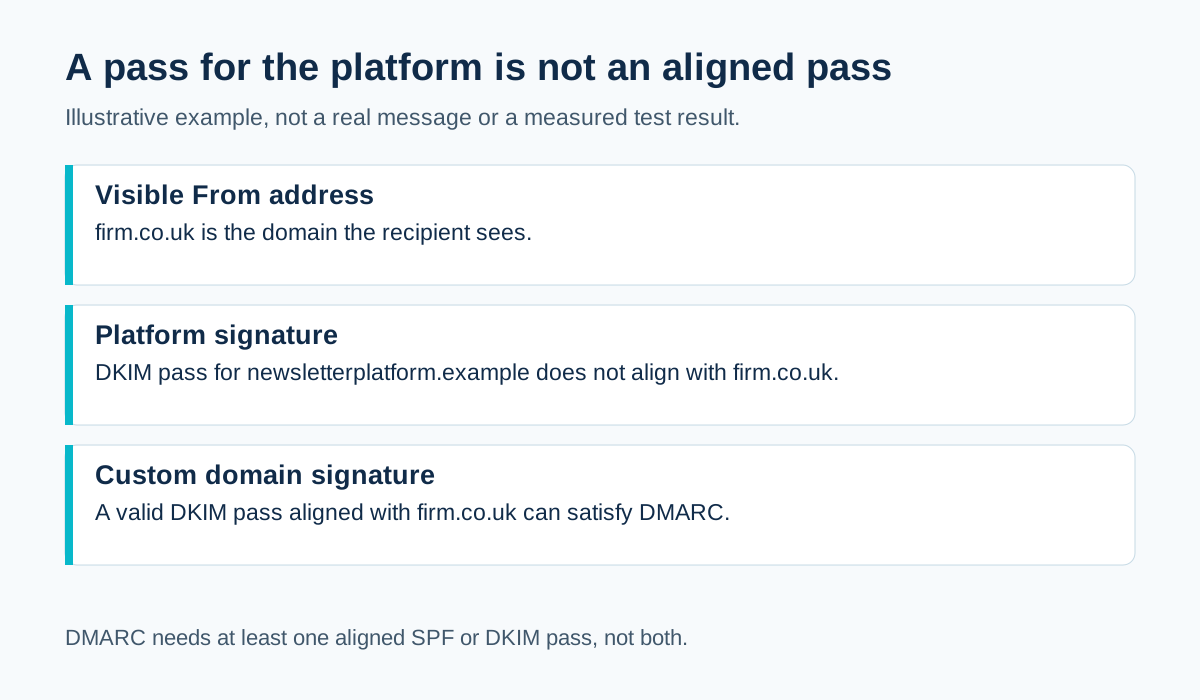
The most common fixable cause. Your email passes SPF or DKIM, but for a supplier's domain rather than yours, so DMARC fails.
This often affects:
- Invoicing tools
- Newsletter platforms
- CRMs
- Booking systems
- Website forms
The fix is to set up custom DKIM (and a custom return path if offered) in each of those tools, so they sign with your domain. See why DKIM can pass while DMARC fails.
If the problem is your own staff email on Microsoft 365, check DKIM is enabled for your custom domain, not just the default onmicrosoft.com domain. See how to set up DKIM in Microsoft 365.
Problem 2: Microsoft's Higher-Volume Sender Rules
If you send a lot of email to Outlook.com, Hotmail and Live addresses, Microsoft has published specific requirements for high-volume senders.
Its announcement applies to domains sending over 5,000 emails a day to its consumer service and requires SPF to pass, DKIM to pass and DMARC of at least p=none, aligned with SPF or DKIM. Microsoft's high-volume sender announcement also says non-compliant messages would be rejected from May 2025.
Most small businesses don't send that much. But meeting those standards anyway is good practice, and it removes one possible cause. See Gmail, Yahoo and Microsoft sender requirements compared.
Problem 3: Your Reputation With Microsoft's Users
Every provider builds its own view of you, based on how its own users react.
If a good chunk of your Outlook.com and Hotmail recipients:
- Delete your emails without opening them
- Mark them as junk
- Never engage at all
then Microsoft's filters learn that your mail isn't wanted, even if Gmail users love it.
That's why one provider can junk you while another delivers fine. Your Microsoft audience might be older contacts, people who signed up years ago, or people who've forgotten who you are.
What helps:
- Stop emailing people who haven't engaged in a long time
- Make unsubscribing easy, so annoyed readers leave instead of clicking "junk"
- Send what people actually signed up for
Problem 4: The Recipient's Own Settings
For a single person, their own settings are often the cause:
- They (or someone else using their account) marked a past email from you as junk
- They have a rule that moves emails with certain words or senders
- Their junk filter is set to a stricter level
- Their organisation's IT team has added rules or quarantine
You can't change these, but you can help them fix it. Ask them to:
- Find your email in Junk and mark it as "Not junk"
- Add your address to their Safe senders list
- Check whether any rules are moving your messages
The guide on how to whitelist an email address has simple steps you can send to customers.
Problem 5: Something About the Message Itself
Content is one signal among many, not a magic list of banned words. But a few things genuinely raise eyebrows:
- Link text that says one thing and points somewhere else
- Link shorteners that hide the real destination
- A single big image with almost no text
- Attachments that are unusual for the relationship (especially unexpected ones)
- A From name that doesn't match the domain or the brand people know
- No plain text version for HTML emails
See why links in emails trigger spam filters and whether you should send plain text or HTML.
Problem 6: Your Sending Pattern Changed Suddenly
A sudden jump in volume, a first-ever newsletter, an import of an old list or a new sending platform can all make filters cautious.
If the junking started right after one of these, that's a strong clue. Slow down, send to your most engaged contacts first and build up gradually. See how to warm up a new email domain.
A Simple Order to Investigate
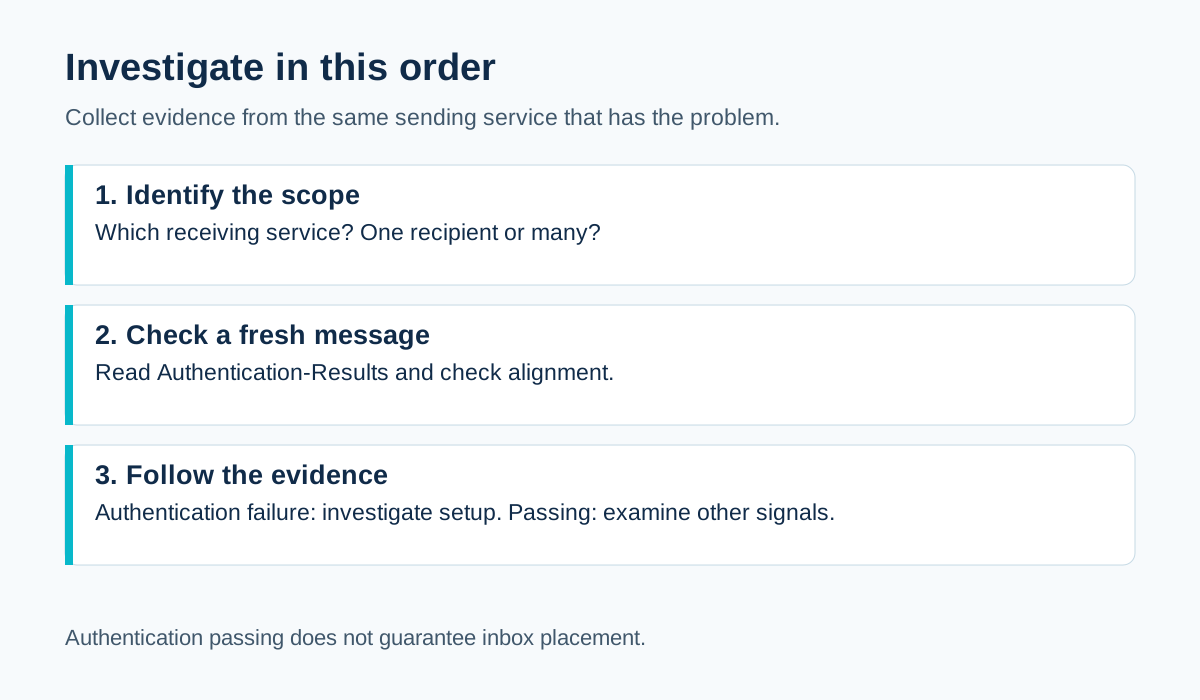
- Ask the recipient: personal Outlook.com/Hotmail, or work email?
- Check whether it's one person or many
- Send a test to your own Outlook.com account through the same route
- Read the headers: do SPF, DKIM and DMARC pass and align?
- If not, fix authentication for that sending route
- If they pass, look at Microsoft's spam headers, your engagement and your recent changes
- For individual recipients, help them mark you as not junk and add you to safe senders
What You Shouldn't Do
- Don't switch to a new domain to "start fresh". It hides the problem and usually doesn't help.
- Don't ask every customer to whitelist you as a substitute for fixing your authentication.
- Don't strip out your logo and branding to look "less like marketing". Recognisable emails get junked less, not more.
- Don't send the same email again and again to "get it through".
A Worked Example: The Accountant Whose Newsletter Went to Hotmail Junk
A fictional Leicester accountancy firm sends a monthly tax tips newsletter. Clients on Gmail see it fine. Clients with Hotmail and Outlook.com addresses keep finding it in Junk.
They send a test to an Outlook.com account and read the headers:
spf=pass smtp.mailfrom=bounce.newsletterplatform.example
dkim=pass header.d=newsletterplatform.example
dmarc=fail header.from=firm.co.uk
Authentication passes for the platform, not for the firm. DMARC fails.
They enable custom DKIM in their newsletter platform. The next test shows dkim=pass for firm.co.uk and dmarc=pass.
They also notice their Hotmail-heavy segment is mostly clients who signed up years ago and rarely open anything. They send a short "do you still want these?" email to that group and remove those who don't respond positively.
Over the following months, fewer complaints, and Outlook.com placement improves. Two fixes, one technical and one about the audience, working together.
Microsoft Consumer vs Business Mailboxes: Who Decides?
                     Outlook.com / Hotmail / Live        Company on Microsoft 365
Who filters?         Microsoft's consumer filtering      Microsoft plus the company's own
                                                         admin rules and any extra tools
Who can help?        The recipient (safe senders,        The recipient AND their IT admin
                     "not junk")                         (quarantine, allow lists)
What you control     Authentication, reputation,         The same, plus asking the client
                     content, audience                   to check with their IT team
If Your Client's Company Keeps Quarantining You
When a business client on Microsoft 365 keeps missing your emails, their IT team may be the only people who can see why. Ask your contact to pass this on:
- "Could you check whether emails from [your domain] are being held in quarantine?"
- "If they are, could you release them and let us know the reason given?"
- "Is there anything specific your filters flag about our emails?"
Before you ask, confirm your own SPF, DKIM and DMARC pass on a test. It's a much easier conversation when you can say "our authentication passes" with a header to prove it.
Quick Checklist: Emails Going to Junk in Outlook
[ ] Identified: consumer Outlook.com/Hotmail or company Microsoft 365?
[ ] Identified: one recipient or many?
[ ] Test sent to own Outlook.com account through the same route
[ ] SPF, DKIM and DMARC pass and align in headers
[ ] Microsoft spam headers checked (SCL) if authentication passes
[ ] Recent changes in volume, list or content reviewed
[ ] Inactive Microsoft recipients reviewed
[ ] Affected recipients asked to mark as Not junk / add to Safe senders
Why Your Own Outlook Inbox Isn't a Fair Test
It's tempting to send yourself an email and conclude "it arrives fine, so the problem must be on the customer's side".
But your own inbox is biased in your favour. You've emailed yourself many times, your address may be in your own contacts and you've probably never marked your own emails as junk. Your mailbox has learned to trust you.
A brand new Outlook.com account, with no history and no contacts, is a much fairer stand-in for a customer who barely knows you. Use one for testing, and don't open, move or reply to your test emails if you want to see how a stranger's inbox treats them.
Frequently Asked Questions
Why do my emails go to junk in Outlook but not Gmail?
Each provider filters differently and builds its own view of your reputation from its own users. Check authentication first, then look at how engaged your Microsoft recipients are.
Can I stop my emails going to junk in someone else's Outlook?
You can fix your authentication and sending practices. For individual recipients, ask them to mark you as "Not junk" and add you to their Safe senders list.
What is SCL in Outlook headers?
Spam confidence level: Microsoft's score for how likely a message is to be spam. A high SCL with passing authentication points to reputation or content rather than DNS.
Does DMARC stop my emails going to junk in Outlook?
DMARC helps receivers trust that your emails are genuine, and Microsoft requires it for high-volume senders. It doesn't guarantee inbox placement on its own.
My client's company uses Microsoft 365. Why are my emails quarantined?
Their IT team may have extra filters or quarantine rules. Ask them to check their quarantine and release or allow your messages, after you've confirmed your own authentication passes.
Should I create an Outlook.com account to test my emails?
Yes, it's a free and useful way to see how Microsoft's consumer service treats your email. Keep it "cold" (don't mark your emails as safe or move them) for a fair test.
Does sending fewer emails help with Outlook junk problems?
It can help if you've been sending lots to unengaged recipients. Focusing on people who actually engage usually improves how filters treat you.
Can a link in my email signature send messages to junk?
It can, if it points to a domain with a poor reputation or uses a link shortener. Check every signature link.
How long does it take to fix emails going to junk in Outlook?
Authentication fixes take effect as soon as DNS updates and the sending tool is configured. Reputation improvements are gradual, as Microsoft sees consistent, wanted email from you over time.
Does Outlook junk email based on words in the subject?
Content is one signal among many. Misleading or spammy wording doesn't help, but authentication, reputation and recipient behaviour usually matter more.
Is Hotmail treated the same as Outlook.com?
Hotmail, Outlook.com and Live addresses are all part of Microsoft's consumer email service, so they're generally filtered by the same systems.
Can my IT provider fix Outlook junk problems?
They can check your authentication and Microsoft 365 setup. For your other sending tools, they may need access to those platforms' settings too.
Sources and further reading
- Microsoft Learn: How email authentication works in Microsoft 365
- Microsoft: View internet message headers in Outlook
- Microsoft: Outlook.com high-volume sender requirements
Related reading
- Why business email goes to spam
- How to read email headers
- How to whitelist an email address