
Most email security advice is about the email you send: SPF, DKIM, DMARC, stopping people spoofing your domain.
MTA-STS is different. It protects the email coming to you.
So what is MTA-STS? It's a way of telling other mail servers: "When you deliver email to my domain, you must use a secure, encrypted connection to these specific servers, and if you can't, don't deliver it."
Why would that matter? Because by default, email encryption between servers is "opportunistic". Servers try to encrypt, but if something interferes with that attempt, many will quietly fall back to sending your email unencrypted. Someone positioned in the middle could, in principle, strip the encryption and read or redirect your incoming mail without anyone noticing.
MTA-STS closes that gap. And its partner, TLS-RPT, sends you reports when other servers have trouble connecting securely, which turns out to be useful in ways most people don't expect.
This guide explains both in plain English, shows you the records and file involved, and walks you through a safe rollout that won't stop your incoming email.
The Problem MTA-STS Solves: Encryption That Can Be Quietly Switched Off
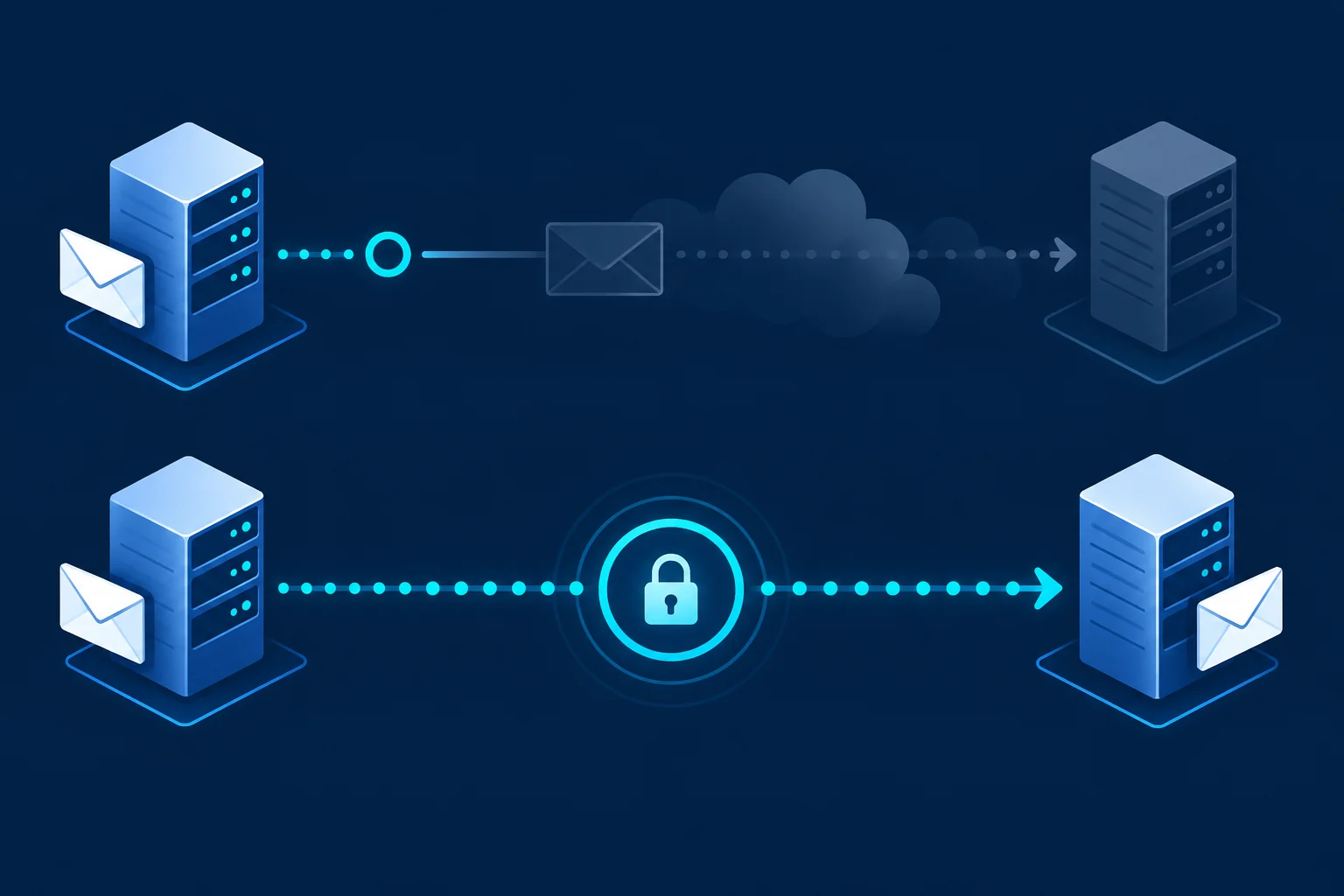
When one mail server delivers to another, they usually try to encrypt the connection using a feature called STARTTLS.
Here's the weak spot. STARTTLS is offered and accepted during the conversation between servers. If an attacker interferes with that conversation (for example, by removing the offer to encrypt), the sending server might simply deliver the email unencrypted.
It's a bit like a courier who's supposed to use a locked van, but if someone tells them "the lock's broken today", they just use an open trailer instead. No alarm, no warning.
MTA-STS gives the courier a firm instruction in advance: "Always use the locked van to these addresses. If you can't, don't deliver."
RFC 8461 defines MTA-STS.
Do Small Businesses Need MTA-STS?
It's not as urgent as SPF, DKIM and DMARC. Those should come first.
But MTA-STS is worth considering if:
- You receive sensitive information by email (financial, legal, health, personal data)
- Your customers or clients expect strong security
- You've already got SPF, DKIM and DMARC sorted
- You want visibility of connection problems affecting your incoming mail
It's relatively low-cost to set up and, done carefully in testing mode first, low-risk.
How MTA-STS Works: Two Pieces
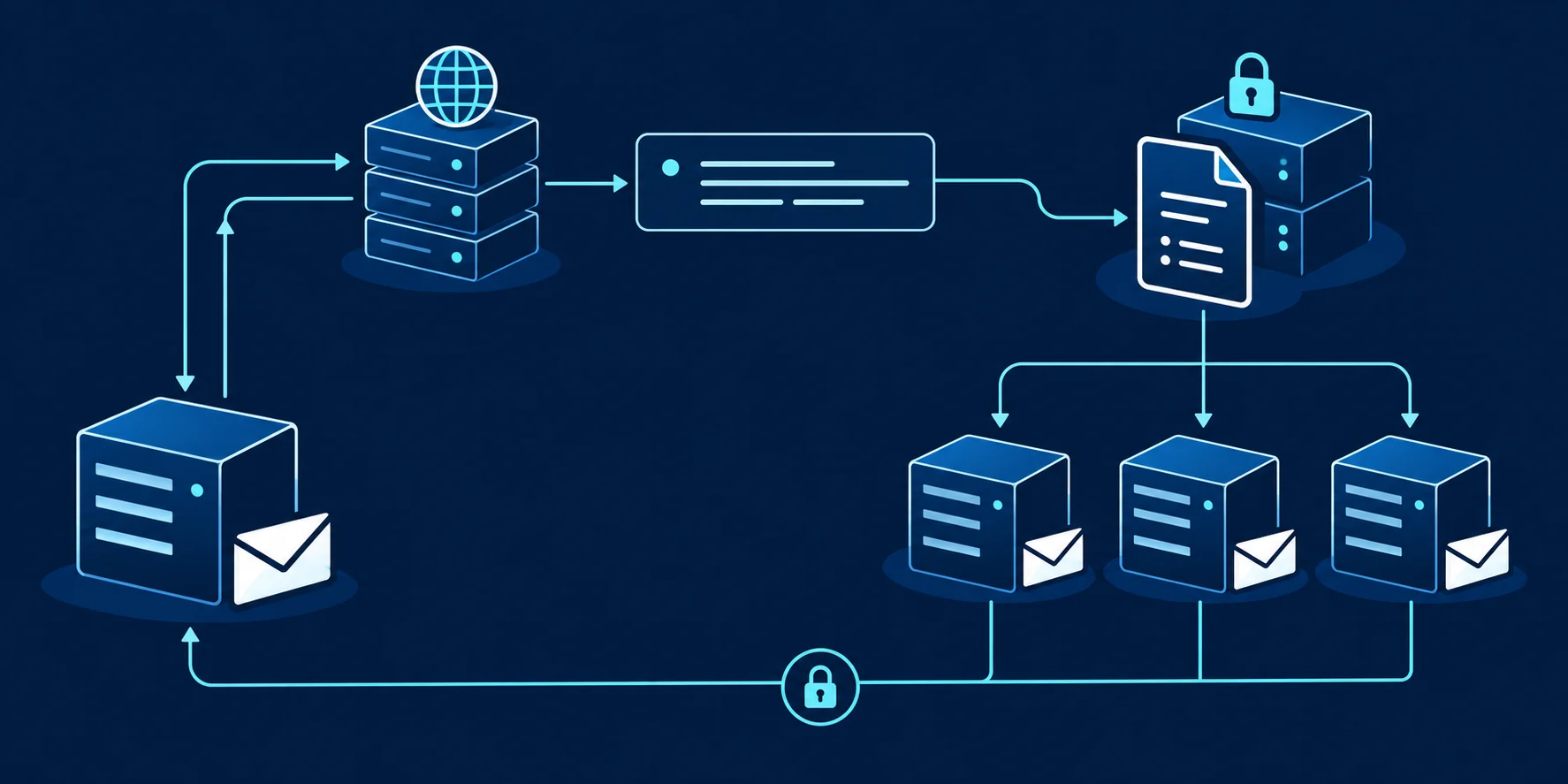
MTA-STS needs two things:
- A DNS TXT record that says "this domain has an MTA-STS policy" and gives it a version ID
- A small text file (the policy) hosted on a specific web address over HTTPS
Sending servers that support MTA-STS check for the DNS record, fetch the policy file and remember it for a set period.
Piece 1: The DNS Record
Name:  _mta-sts.yourbusiness.co.uk
Type:  TXT
Value: v=STSv1; id=20261012T120000- v=STSv1: the version
- id=: any unique string. Change it every time you update your policy file, so senders know to fetch the new version. Many people use a date and time.
Piece 2: The Policy File
The policy lives at this exact address:
https://mta-sts.yourbusiness.co.uk/.well-known/mta-sts.txtAnd contains something like:
version: STSv1
mode: testing
mx: mail.example-provider.com
mx: *.example-provider.net
max_age: 86400- version: always STSv1
- mode: testing, enforce or none (more on this below)
- mx: one line per mail server that's allowed to receive your email. These must match your MX records.
- max_age: how long (in seconds) sending servers should remember the policy. 86400 is one day.
The hosting catch
You need a subdomain called mta-sts.yourbusiness.co.uk, serving that file over HTTPS with a valid certificate. That's the bit that makes people pause. Some web hosts and DNS services make it easy; others need a developer's help. Some email security services offer hosted MTA-STS as a feature.
Getting the mx Lines Right (the Step That Breaks Things)
The mx lines in your policy must match the servers in your domain's MX records. Get them wrong, and in enforce mode, legitimate senders will refuse to deliver your email.
Check your current MX records:
dig +short MX yourbusiness.co.ukThen list each MX hostname in your policy. Wildcards (like .example-provider.net) are allowed, but they only match one level of subdomain. A wildcard for .example.net matches mail.example.net but not mx1.mail.example.net. List hostnames carefully, based on exactly what your MX records show.
If your email provider publishes recommended MTA-STS mx values, follow their current guidance.
The Three Modes: Start With Testing
- testing: senders check the policy and report problems (via TLS-RPT), but still deliver if there's an issue. Safe to start with.
- enforce: senders refuse to deliver unless they can connect securely to a listed server. This is the protection.
- none: tells senders to stop applying the policy. Used when you're removing MTA-STS.
Always start in testing mode. Run it for a few weeks, read the reports, fix any problems, then move to enforce.
TLS-RPT: The Reports That Tell You What's Going Wrong

TLS-RPT (SMTP TLS Reporting) is MTA-STS's partner. It asks sending servers to send you daily reports about their attempts to connect securely to your mail servers. RFC 8460 defines it.
Name:  _smtp._tls.yourbusiness.co.uk
Type:  TXT
Value: v=TLSRPTv1; rua=mailto:tls-reports@yourbusiness.co.uk
Reports arrive as JSON files and show:
- How many connections succeeded securely
- How many failed, and why (certificate problems, policy mismatches and so on)
- Which sending organisations reported
You can set up TLS-RPT on its own, even without MTA-STS. It's a useful early-warning system for problems with your incoming mail.
A Safe Rollout Plan
- Set up TLS-RPT first. Publish the _smtp._tls record and start collecting reports.
- Create the mta-sts subdomain. Make sure it serves HTTPS with a valid certificate.
- Publish the policy file in testing mode. List your MX hosts carefully.
- Publish the _mta-sts TXT record with an id.
- Watch TLS-RPT reports for a few weeks. Look for failures.
- Fix any issues. Usually mx line mismatches or certificate problems.
- Switch to enforce. Update the mode in the policy file and change the id in the DNS record.
- Keep monitoring. And update the policy whenever your mail servers change.
Microsoft 365 and Google Workspace Users
If you use Microsoft 365 or Google Workspace, your incoming mail servers are run by Microsoft or Google, and they support secure connections. You can still publish MTA-STS for your domain, listing their MX hostnames in your policy.
The hosting of the policy file is still your responsibility (on your mta-sts subdomain), unless you use a service that hosts it for you.
Check each provider's current guidance for the MX hostnames to list.
What Can Go Wrong
- The policy file isn't reachable (wrong URL, no HTTPS, expired certificate)
- mx lines don't match your MX records
- You change email provider and forget to update the policy
- You change the policy file but forget to update the id, so senders keep using the old cached version
- You go straight to enforce without testing
Testing mode and TLS-RPT catch almost all of these before they cause real problems.
Where MTA-STS Fits in Your Email Security
Think of it as layers:
- SPF, DKIM, DMARC: stop people faking your outgoing email (the priority for most businesses)
- MTA-STS and TLS-RPT: protect incoming email from interception and give you visibility of delivery problems
- Account security (two-factor login): stops criminals logging into your mailbox
Get the first and third right first. Then MTA-STS is a sensible next step.
Reading Your First TLS-RPT Report
TLS-RPT reports arrive as JSON files, usually compressed. They're designed for machines, but the key information is easy enough to spot once you know where to look.
A simplified, illustrative fragment:
{
  "organization-name": "receiver.example",
  "date-range": { "start-datetime": "...", "end-datetime": "..." },
  "policies": [{
    "policy": { "policy-type": "sts", "policy-domain": "yourbusiness.co.uk" },
    "summary": {
      "total-successful-session-count": 1240,
      "total-failure-session-count": 3
    },
    "failure-details": [{ "result-type": "certificate-expired", ... }]
  }]
}
What to look at:
- Who sent the report (organization-name)
- The success and failure counts
- The failure reasons (result-type), if any
A handful of failures with varied reasons might be noise. A consistent pattern (like every connection failing a certificate check, or a policy mismatch) points to a real problem to fix before you move to enforce.
A Worked Example: The Policy That Would Have Blocked Email
A fictional Oxford law firm sets up MTA-STS in testing mode. They list their MX hostname in the policy, but make a typo in one letter.
Their TLS-RPT reports start showing failures with a policy mismatch reason. Because they're in testing mode, email still arrives. Nothing is lost.
They spot the typo, fix the policy file, update the id in their DNS record and watch the next week's reports: failures drop to zero. Only then do they switch to enforce.
If they'd gone straight to enforce, senders that support MTA-STS would have refused to deliver to them until someone noticed. Testing mode turned a potential outage into a small, quiet fix.
Keeping MTA-STS Healthy Over Time
MTA-STS isn't set-and-forget. Add these to your routine:
- Check the policy file is still reachable over HTTPS (and the certificate hasn't expired)
- Keep the mx lines in step with your MX records
- Update the id whenever the policy changes
- Review TLS-RPT reports periodically for new failures
- Plan MTA-STS changes into any email provider migration
The certificate on your mta-sts subdomain is a common weak point. If it expires, senders can't fetch your policy. Make sure it renews automatically, or put a reminder in the calendar.
MTA-STS Checklist
[ ] SPF, DKIM and DMARC already sorted
[ ] TLS-RPT record published at _smtp._tls
[ ] mta-sts subdomain serving HTTPS with a valid certificate
[ ] Policy file at /.well-known/mta-sts.txt, mode: testing
[ ] mx lines match current MX records exactly
[ ] _mta-sts TXT record published with an id
[ ] TLS-RPT reports reviewed for a few weeks
[ ] Issues fixed, policy switched to enforce, id updated
[ ] Certificate renewal and MX changes on the maintenance list
How MTA-STS Fits With DANE
You may come across another standard called DANE, which can also require encrypted mail delivery. It relies on DNSSEC, a set of security extensions for DNS that many small business domains don't use.
MTA-STS was designed to work without DNSSEC, using a web-hosted policy instead. That makes it more accessible for many businesses.
You don't need to choose between them unless you're already using DNSSEC. For most small businesses, MTA-STS (with TLS-RPT) is the practical option. If your IT provider or DNS host supports DANE, they can advise whether it's worth adding too.
What MTA-STS Doesn't Protect
To keep expectations realistic:
- It doesn't encrypt emails end to end (servers along the way can still read them)
- It doesn't stop phishing or spoofing (that's DMARC's job)
- It only applies to senders whose servers support MTA-STS
- It doesn't protect the email you send to other people's domains (they'd need their own MTA-STS)
It's one sensible layer, not a complete solution.
A Quick Word on Cost
The DNS records are free. The policy file is tiny. The main cost is hosting it on an HTTPS subdomain with a valid certificate. Many web hosts can do this easily, and free certificate services are widely available. Some email security tools include hosted MTA-STS.
For most small businesses, the real investment is an hour or two of setup and a little ongoing attention.
A Worked Example: Spotting a Problem Nobody Knew About
A fictional Leeds accountancy firm publishes TLS-RPT purely out of curiosity, without MTA-STS yet.
Within a fortnight, reports show a small but steady number of failed secure connections from one sending organisation, with a certificate-related reason. Digging in, their IT provider finds that one of the firm's mail routing settings was presenting an outdated certificate in certain situations.
Nobody had noticed, because email was still being delivered (just not always securely). They fix it, then go on to set up MTA-STS in testing mode, and later enforce.
TLS-RPT turned an invisible weakness into a visible, fixable one.
MTA-STS and Compliance Expectations
Some clients and industries expect suppliers to demonstrate strong email security, especially where sensitive information is exchanged. MTA-STS (alongside SPF, DKIM and DMARC) is a concrete, checkable control you can point to.
If you fill in security questionnaires for clients, "do you enforce encryption for inbound email?" is the kind of question MTA-STS helps you answer confidently.
Frequently Asked Questions
What does MTA-STS stand for?
Mail Transfer Agent Strict Transport Security.
Does MTA-STS encrypt my email?
It requires encryption in transit between mail servers when delivering to your domain. It doesn't encrypt the email's content end to end.
Will MTA-STS stop my incoming email?
In enforce mode with wrong settings, it can. That's why you start in testing mode and watch TLS-RPT reports first.
Do I need MTA-STS if I have DMARC?
They do different jobs. DMARC protects against spoofing of your domain. MTA-STS protects incoming mail in transit.
Can I use TLS-RPT without MTA-STS?
Yes. TLS-RPT reports are useful on their own for spotting problems with secure delivery to your mail servers.
How long should the max_age be in my MTA-STS policy?
Start short while testing (a day or so), then lengthen it once you're confident, often to several weeks. A long max_age means sending servers remember your policy for longer, which is great when it's right and painful when it's wrong.
Do I need to update MTA-STS when I change email provider?
Yes. Your policy lists your mail servers, so a provider change means updating the mx lines and the policy id. Forgetting this is one of the most common ways MTA-STS breaks incoming email.
Can I host the policy file on my normal website?
Only if your web host can serve it at mta-sts.yourdomain.co.uk over valid HTTPS. Many small businesses use a simple hosting service or their provider's helper tool instead.
Is MTA-STS hard to remove if something goes wrong?
You can switch the policy to "none" and update the id, but servers that cached your old policy may remember it until max_age expires. That's why starting with a short max_age matters.
Sources and further reading
- RFC 8461: SMTP MTA Strict Transport Security (MTA-STS)
- RFC 8460: SMTP TLS Reporting
- NCSC: Email security and anti-spoofing
Related reading
- How to find who hosts your DNS
- How to switch email providers without losing email
- Email authentication glossary