An email arrives from a supplier you've worked with for years. Same name, same email address, same signature. It says their bank details have changed and asks you to pay this month's invoice to the new account.
It looks completely normal. It might even reply to a genuine thread you were already in.
And it might be a fake invoice email with changed bank details, sent by a criminal.
If you've received a fake invoice email with changed bank details, or you want to make sure you never pay one, here's the uncomfortable truth most security advice skips: the most dangerous versions often pass every technical check. SPF, DKIM, DMARC, all green. Because the criminal isn't faking the supplier's email. They've broken into it.
That's why no spam filter, DNS record or software can fully protect you from this one. What protects you is a simple process, followed every single time. This guide explains how these scams actually work, the warning signs worth knowing and the one rule that stops almost all of them.
How Invoice Fraud Usually Works
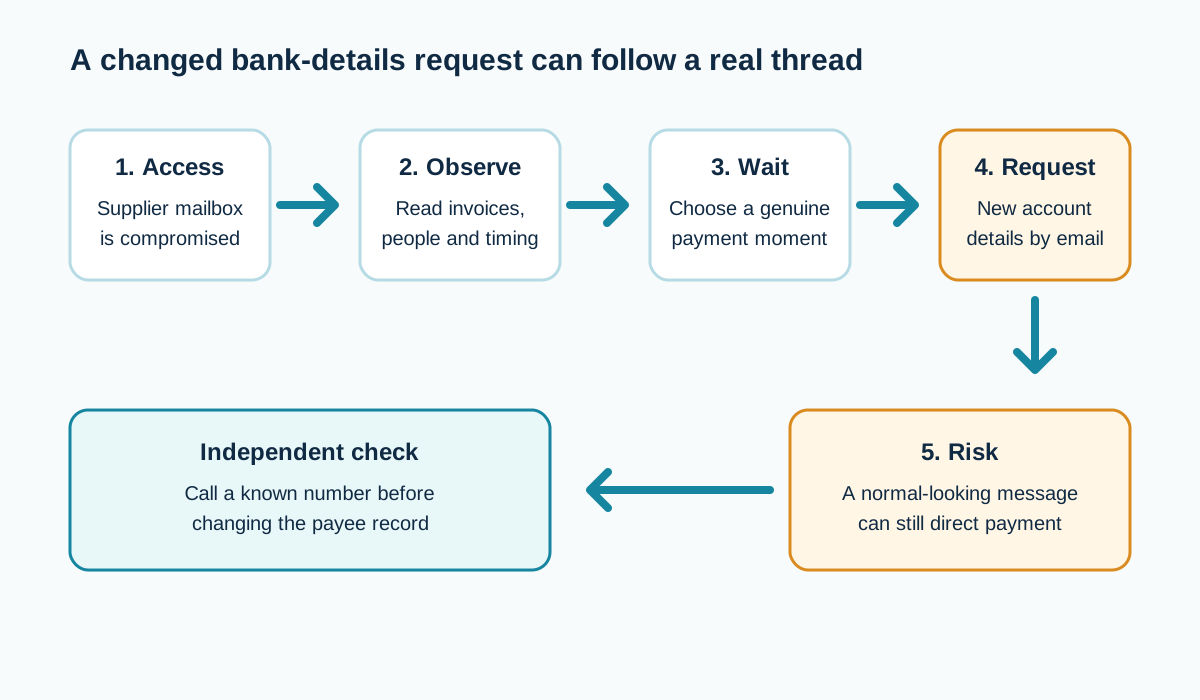
The most effective version (often called business email compromise, or mandate fraud) goes like this:
- A criminal gets into a supplier's email account, often through a phishing email that stole their password
- They quietly read emails for days or weeks, learning who pays whom, how much and when
- They wait for a real invoice to be due
- They reply to a genuine thread, or send a new email from the real account, saying the bank details have changed
- You pay the new account
- The money is moved on quickly
Because the email genuinely came from the supplier's real mailbox, it often looks perfect. It might even reference real projects and real amounts.
The Variations to Watch For
Not every fake invoice comes from a hacked account. You might see:
- A hacked supplier account: the hardest to spot, because everything looks right
- A lookalike domain: from accounts@yoursupp1ier.co.uk instead of yoursupplier.co.uk
- Display name spoofing: shows "Your Supplier Ltd" but the actual address is a free email account
- A forged exact domain: where the supplier has no DMARC enforcement, a criminal can fake their address directly
- A fake "new finance contact": "Hi, I've taken over accounts from Sarah, please use these details going forward"
DMARC on your supplier's domain can stop the forged exact-domain version. It can't stop the others.
Red Flags Worth Training Everyone to Notice
None of these prove fraud on their own. Together, they should make you stop:
- Any request to change bank details, by email, for any reason
- Urgency: "please pay today", "our old account is frozen", "the director needs this urgently"
- Secrecy: "please don't call, I'm in meetings all day"
- Slight changes in tone, spelling or sign-off
- A reply-to address that differs from the From address
- A domain that's almost right but not quite
- A new contact you've never heard of handling payments
- An unusual payment amount or timing
- Pressure to pay before a normal approval process can happen
The One Rule That Stops Most Invoice Fraud
Here it is:
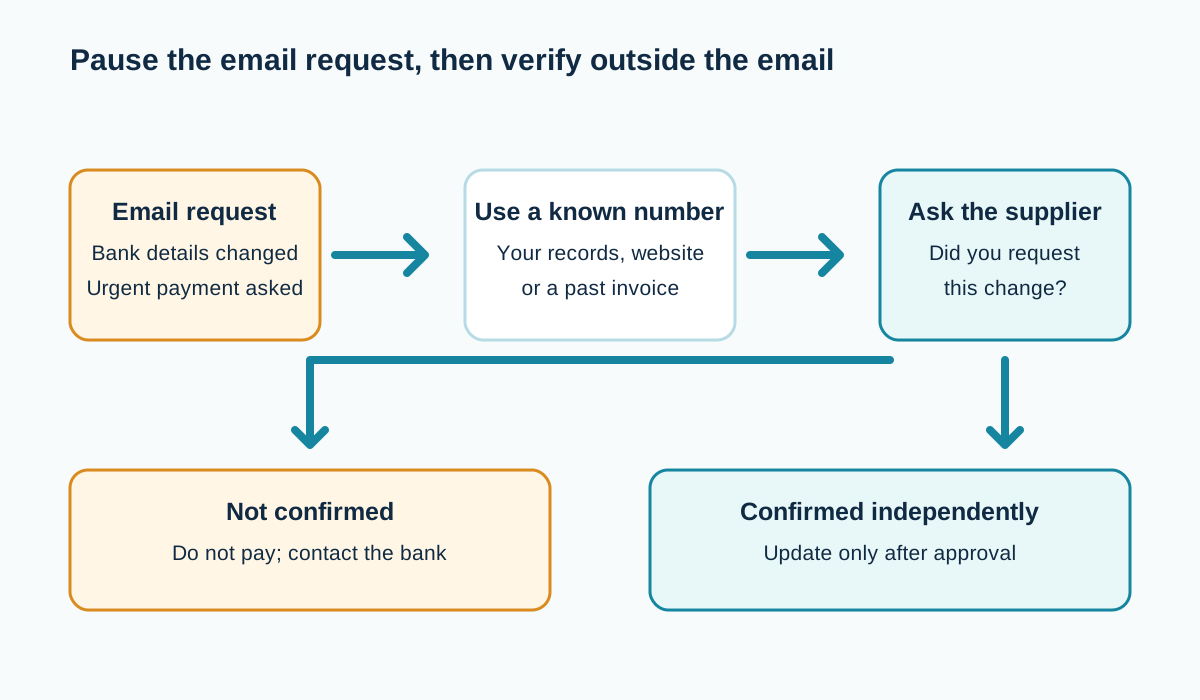
Never change a payee's bank details based on an email alone. Always verify by phone, using a number you already had, not one in the email.
That's it. It sounds almost too simple, but it works because:
- The criminal controls the email account, not the supplier's phone
- A number from your own records, the supplier's website or a past invoice reaches the real business
- A number in the suspicious email might reach the criminal
When you call, ask a question only the real person would know, or ask them to confirm the change came from them without telling them the new details first.
Turn the Rule Into a Process Everyone Follows
A rule that lives in one person's head fails the day they're on holiday. Write it down:
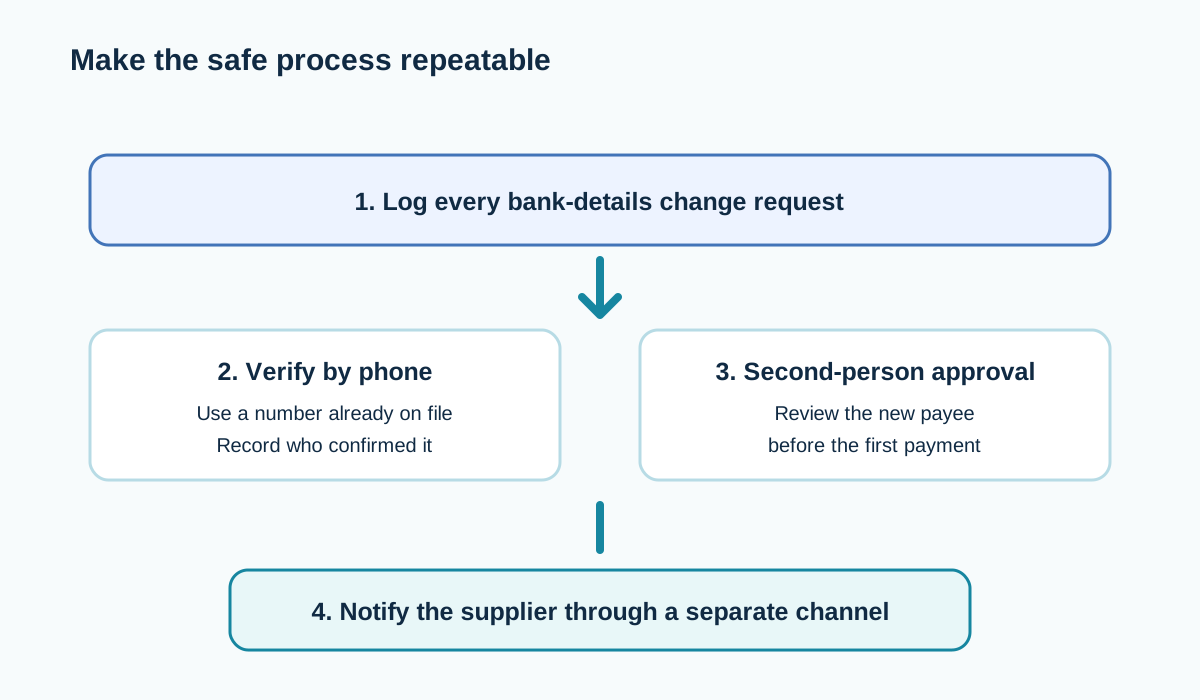
- Any bank detail change request is logged, whatever the source
- The change is verified by phone using a number from your existing records
- A second person approves the change before it's made in your payment system
- The first payment to new details is checked carefully (some businesses send a small test amount first)
- The supplier is told by a separate channel that the change has been made
Share the process with everyone who can make or approve payments. Include temporary staff and anyone covering holidays.
Use the Tools Your Bank Gives You
UK banks offer a name-checking service when you set up a new payee, known as Confirmation of Payee. It checks whether the account name you've entered matches the name on the account.
If you get a warning that the name doesn't match or only partly matches, take it seriously. Stop and verify.
Ask your bank what other protections they offer for business payments, like dual authorisation for new payees or payment limits.
Protect Your Own Customers From Fake Invoices in Your Name
Criminals may also impersonate you to your customers. To reduce the risk:
- Publish DMARC and move it to p=quarantine or p=reject once your own senders are aligned (see the DMARC setup guide)
- Tell customers on every invoice: "We will never change our bank details by email. Please call us on [number] if you receive such a request."
- Send invoices from a consistent, authenticated address (see invoice emails going to spam)
- Protect lookalike domains you own
Protect Your Own Mailboxes (So You're Not the Hacked Supplier)
The other side of this scam: your account could be the one that gets compromised and used to defraud your customers.
- Turn on two-factor login for every mailbox, especially finance and directors
- Train staff to spot phishing and password-stealing emails
- Regularly check for unfamiliar inbox rules and forwarding
- Use unique, strong passwords (a password manager helps)
- Remove access for people who've left
See signs your business email has been hacked.
What to Do If You've Already Paid
Speed matters enormously.
- Call your bank immediately and tell them it's a suspected fraud. Ask them to try to recall the payment.
- Report it to Action Fraud
- Contact the genuine supplier by phone to confirm the fraud and warn them their email may be compromised
- Preserve the emails (don't delete them; they're evidence)
- Check your own mailboxes for signs of compromise too, in case criminals got in through you
What to Do If You Spot a Fake Before Paying
- Don't reply to the email
- Call the supplier on a known number and tell them
- Forward the suspicious email to the NCSC's Suspicious Email Reporting Service at report@phishing.gov.uk (see the NCSC's phishing guidance)
- Warn colleagues who might receive similar emails
- Note the attempt in your payment process log
A Worked Example: The Email That Almost Cost £18,000
A fictional Exeter joinery firm receives an email from their timber supplier, replying in the existing thread about last month's order. It says the supplier has moved banks and gives new details for an invoice of about £18,000.
The office manager notices two things: the email asks them not to call because "the office phones are being upgraded", and the payment is marked urgent.
She follows the firm's rule anyway and phones the supplier on the number from their previous invoices. The supplier hasn't changed banks. Their email account had been compromised a week earlier.
The phone call took three minutes. It saved the business £18,000, and alerted the supplier to a breach that was also targeting their other customers.
Wording You Can Put on Your Invoices Today
Add a short, clear line to every invoice and to your email signature:
Important: [Business Name] will never change our bank details by
email. If you receive a message asking you to pay a different account,
please call us on [number from your website] before making any payment.
Put it near the bank details, where people look when paying. It helps your customers protect themselves, and protects you from awkward disputes if a fake invoice ever goes out in your name.
Train Your Team in Ten Minutes
You don't need a long course. Cover these points in a short team chat and repeat them every few months:
- Bank detail changes are always verified by phone, using a number we already have
- Urgency and secrecy are warning signs, not reasons to rush
- Check the actual email address, not just the name
- Never approve a login prompt you didn't start
- If in doubt, stop and ask, and nobody will be criticised for checking
The last point matters. People pay fraudulent invoices when they're afraid of looking slow or awkward. Make checking the normal, praised behaviour.
Supplier Onboarding: Set the Rules From Day One
When you take on a new supplier, agree how changes will be handled before anything goes wrong:
- Record their bank details from a verified source (not just an email)
- Record a trusted phone number for their accounts team
- Tell them your own process: "We'll always phone to confirm any change of bank details"
- Ask for theirs: how will they confirm changes to you?
Suppliers who know you'll call are less valuable targets, and genuine suppliers usually welcome the extra care.
What the Email Header Can (and Can't) Tell You
If you're suspicious, looking at the header can reveal some fakes:
- A From address on a slightly different domain (lookalike)
- A Reply-To address that sends replies somewhere else
- SPF, DKIM or DMARC failing for the supplier's domain (possible forgery)
But a clean header doesn't prove the request is genuine. If the supplier's account has been hacked, everything will look perfect. That's why the phone call matters more than any technical check. See how to read email headers.
Why Criminals Wait for the Perfect Moment
The patience is what makes this fraud so effective. A criminal with access to a supplier's mailbox might watch for weeks, learning:
- Which customers pay large invoices
- When invoices are usually sent and paid
- Who approves payments at each customer
- How the supplier writes, signs off and refers to projects
Then they act at exactly the moment a real invoice is due, so the request feels routine. Sometimes they even intercept and edit a genuine invoice PDF, changing only the bank details.
That's why the timing of a bank details change ("our account has changed, and this month's invoice is due") should make you more cautious, not less.
Edited Invoices: When the PDF Itself Is Fake
A growing variation: the criminal takes a genuine invoice PDF from the compromised mailbox, edits the bank details and sends it back as a "corrected" version.
Everything else on the invoice is real: the job, the amount, the invoice number, the logo. Only the account number and sort code change.
Protection:
- Compare bank details on every invoice with the details you already hold for that supplier
- Configure your payment system so changing a supplier's bank details requires separate approval
- Treat "corrected" or "updated" invoices with new bank details exactly like any other bank details change: phone to verify
Make Your Payment System Do the Checking
Many accounting and payment systems let you:
- Lock supplier bank details so they can't be changed without approval
- Require two people to approve new payees or changes
- Flag payments to new or recently changed accounts
- Set payment limits that need extra approval
Turn these on. They turn your verification rule from "something people should remember" into "something the system enforces".
A Payment Change Request Log Template
Date received:
Supplier:
Requested by (name / email address):
Old account (last 4 digits):
New account (last 4 digits):
Verified by phone? Y/N   Number used (from our records):
Person spoken to:
Verified by (staff name):
Approved by (second person):
Date changed in payment system:
Supplier notified of change by separate channel? Y/N
Keep it simple. The point is that every change leaves a trail and passes through two people.
Frequently Asked Questions
Can an email pass SPF, DKIM and DMARC and still be fraud?
Yes. If a criminal is sending from a genuinely compromised account, the email really did come from that domain's systems, so authentication passes.
How do I verify a supplier's new bank details?
Phone them using a number you already have from your own records or their official website, never one from the email requesting the change.
What is Confirmation of Payee?
A UK banking check that compares the name you enter for a new payee with the name on the account, and warns you if they don't match.
Who do I report invoice fraud to in the UK?
Your bank immediately, then Action Fraud. Forward suspicious emails to report@phishing.gov.uk.
Can DMARC protect my customers from fake invoices in my name?
It can stop criminals forging your exact domain when your policy is at quarantine or reject. It can't stop lookalike domains or emails from a compromised account.
Is invoice fraud common for small businesses?
It's a well-known and widespread fraud type that targets businesses of all sizes, partly because small businesses often have fewer checks in place.
Can my bank get the money back?
Sometimes, if you report it very quickly. Contact your bank immediately and report to Action Fraud. Speed matters.
Should I stop paying a supplier whose email was hacked?
Not necessarily. Verify their bank details by phone using a known number, and continue paying the verified account.
What should I do if a supplier tells me their email was hacked?
Treat any recent payment requests from them with suspicion, verify all bank details by phone and check whether any payments were made to changed details.
Can I insure against invoice fraud?
Some business and cyber insurance policies cover certain types of fraud. Check your policy wording and speak to your insurer or broker.
Is a phone call enough to verify new bank details?
Only if you call a number you already had on file, not one from the email asking for the change. Criminals often include their own phone number so the "check" reaches them.
Sources and further reading
Related reading
- Someone is sending emails from my domain
- Signs your business email has been hacked
- What is DMARC?