You sent the invoice on the 1st. On the 30th, you chase it. "Oh, we never got it," says the client. "Can you send it again?"
If you've got invoice emails going to spam, it isn't just an email problem. It's a cash flow problem. Every invoice that sits unseen in a junk folder is money you're waiting longer for, plus time spent chasing, plus the awkwardness of sounding like you're nagging.
Here's what makes invoices especially vulnerable, and it's something most guides skip: to a spam filter, a genuine invoice and a fraudulent invoice look remarkably similar. Both say "invoice". Both ask for money. Both often have an attachment or a payment link. Criminals copy the format precisely because businesses trust it.
So your real invoices have to work harder to prove they're genuine. This guide shows you exactly how: authenticating your accounting software properly, making invoices look trustworthy and putting simple safety nets in place so a filtered email never costs you a month's cash flow again.
Why Invoices Are a Spam Filter's Favourite Suspect
Think about what spam filters are trained to catch: phishing, fraud, malware. Now think about what a fake invoice scam looks like:
- Subject line with "invoice" or "payment due"
- Urgent tone
- An attachment, often a PDF
- A link to "view and pay"
- A request to send money
Your genuine invoice has most of those features too.
Filters, especially at companies with security gateways in front of their finance teams, are understandably suspicious of anything that looks like a payment request. They're right to be. Invoice fraud costs businesses a fortune.
The Hidden Reason: Your Accounting Software Sends as "You" From Its Own Servers
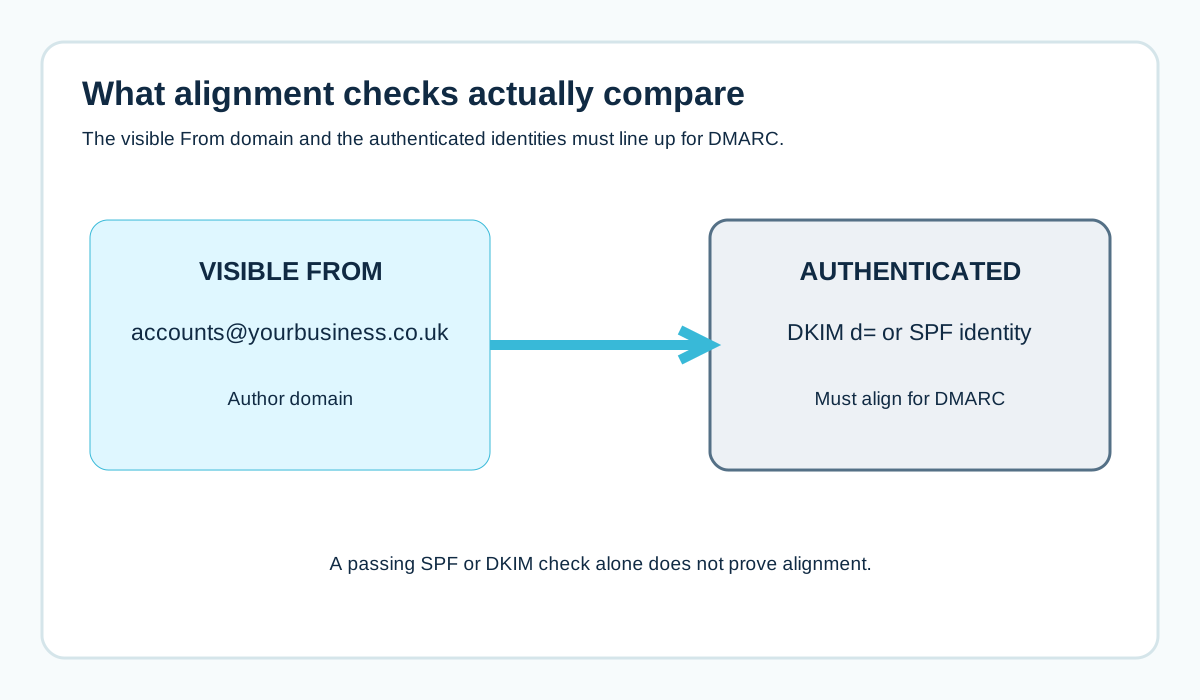
When you click "send" in your accounting or invoicing software, the email usually doesn't go through your own mailbox. It goes from the software provider's servers, with your business address in the From line.
That's normal. But unless you've set it up properly, the email may be authenticated for the software provider's domain, not yours.
In the email header, you'd see something like:
From: Accounts <accounts@yourbusiness.co.uk>
spf=pass smtp.mailfrom=bounces.accountingsoftware.example
dkim=pass header.d=accountingsoftware.example
dmarc=fail header.from=yourbusiness.co.uk
Both checks passed. Neither was for your domain. DMARC fails.
If your domain has a DMARC policy of quarantine or reject, those invoices can go straight to spam or be rejected entirely. Even at p=none, an unaligned invoice is less trustworthy to filters than an aligned one.
For a full explanation of this pattern, see why DKIM can pass while DMARC fails.
Step 1: Check How Your Invoices Are Authenticated Right Now
The quickest test:
- Create a test contact in your accounting software using your personal Gmail address
- Send them a test invoice (a small or zero-value one, clearly marked as a test)
- In Gmail, open it, click the three dots and choose "Show original"
- Look at the SPF, DKIM and DMARC results at the top, and the d= value in the DKIM-Signature
If DMARC passes and d= is your domain, great. If d= is the software provider's domain, that's your fix.
How to read email headers walks through it in more detail.
Step 2: Turn On Your Software's Domain Authentication
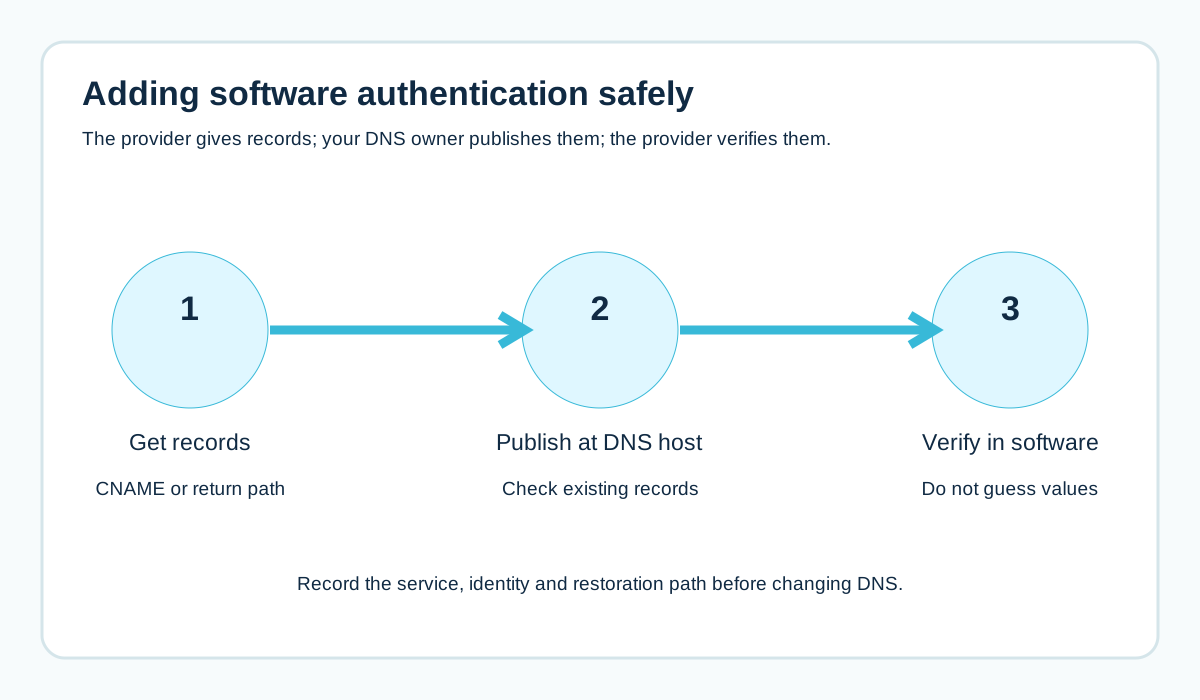
Most established accounting and invoicing platforms offer a way to send emails authenticated with your own domain. It's usually found in email settings and called something like:
- Custom sending domain
- Domain authentication
- Email domain verification
- Send from your own domain
The process is typically:
- Enter your domain in the software's settings
- The software gives you DNS records (often CNAMEs for DKIM, sometimes a return path record)
- You add those records at your DNS host
- You go back to the software and click verify or activate
Check your software's own help pages for the exact steps, because every platform does it slightly differently.
If your software doesn't offer this at all, there are workarounds (like sending invoices from your own mailbox), covered later in this guide.
Not sure where your DNS lives? See how to find who hosts your DNS.
Step 3: Don't Break Your SPF Record While You're at It
Some software providers tell you to add an include to your SPF record. Before you do:
- Check whether the software actually uses your domain as its envelope sender (look at the Return-Path in your test invoice)
- Add the include to your existing SPF record, never as a second record
- Check you don't push your record over the ten-lookup limit
Two SPF records break SPF for everything, including your normal staff email. See the SPF record guide for Microsoft 365 and Google Workspace.
Step 4: Make Your Invoice Email Look Unmistakably Genuine
Authentication proves where an email came from. The email itself also needs to look like it's from a real business the recipient knows.
Use a consistent, recognisable sender
Always send from the same address (like accounts@ or invoices@ your domain) with a clear sender name, like "Hartley Plumbing Accounts". Changing it from month to month makes you look less trustworthy.
Write a clear, specific subject
"Invoice INV-1043 from Hartley Plumbing, due 14 November" beats "Your invoice is ready!" It tells the recipient (and the filter) exactly what this is and who it's from.
Include context only you would know
A reference to the job, the date of work or a PO number the client gave you. Fraudsters rarely have this detail.
Keep it simple
Skip the marketing banners, promotions and "while you're here" offers. An invoice should look like an invoice.
Think about attachments vs links
Some company gateways are stricter with attachments; others are stricter with links. Many accounting tools let you include both a PDF and a "view online" link. If a particular client keeps missing invoices, ask their finance team which works better for them.
Step 5: Build a Safety Net So Filtered Invoices Don't Cost You Money
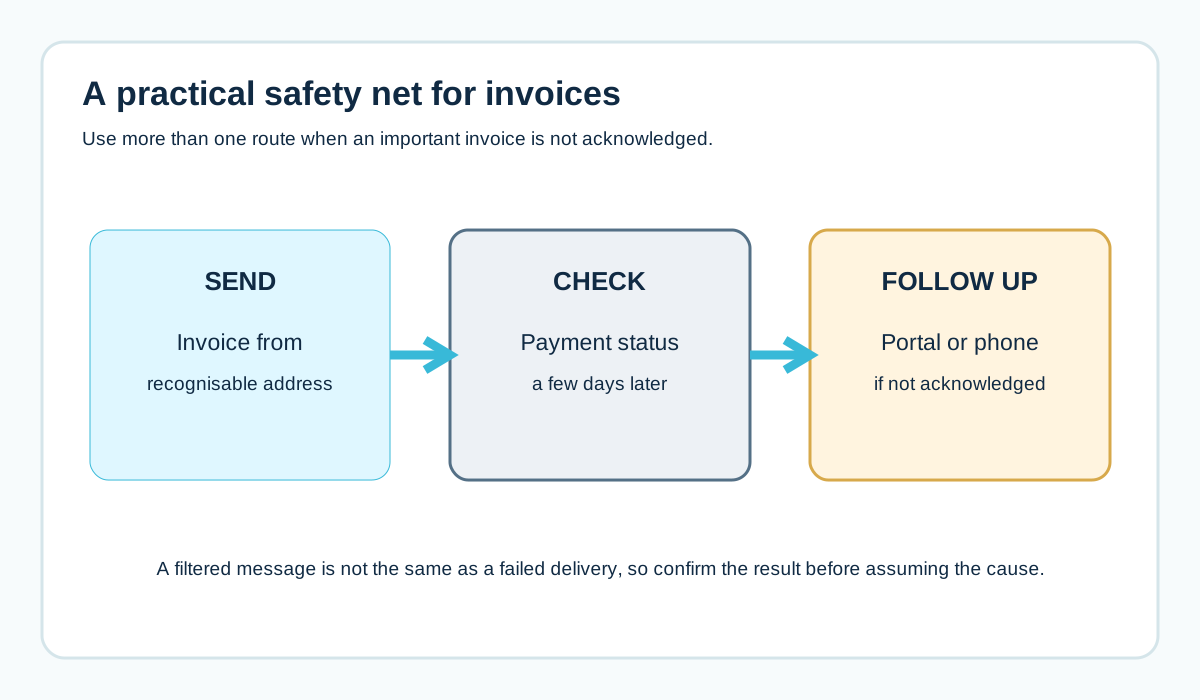
Even with perfect setup, some invoices will get caught by a strict filter somewhere. Plan for it.
- Tell new clients what to expect. "Invoices will come from accounts@ourbusiness.co.uk around the 1st of each month."
- Ask them to add your address to their safe senders list. The guide to whitelisting an email address has steps you can send.
- Use a client portal if your software has one, so clients can log in to see invoices regardless of email.
- Set a reminder to check payment status a few days after sending, not weeks later.
- Follow up through another channel (phone, text) if an important invoice isn't acknowledged.
Special Case: Big Companies With Strict Finance Filters
Invoicing larger organisations brings extra challenges. Their finance or accounts payable teams often sit behind security gateways that quarantine anything suspicious, and quarantine isn't something your contact can always see.
If invoices to one big client keep disappearing:
- Ask whether they have a specific accounts payable address you should use
- Ask whether they have a supplier portal for invoice submission
- Ask their IT team to check quarantine for your domain
- Confirm your authentication passes on a test sent to that client (with their agreement)
Sometimes the answer is simply that the client wants invoices submitted a particular way, and email isn't it.
What If Your Accounting Software Can't Authenticate Your Domain?
If your platform genuinely has no domain authentication option, you have a few choices:
- Download the invoice and send it from your own business mailbox (Microsoft 365 or Google Workspace), which you can authenticate properly
- Change the From address the software uses to one on a subdomain you're comfortable treating separately (accepting it may not align)
- Ask the provider whether it's on their roadmap
- Consider whether a different platform would serve you better
What you shouldn't do is lower your domain's DMARC policy to make invoice emails pass. That weakens protection for every email claiming to be from you, including against invoice fraud.
A Worked Example: The Builder Who Was Waiting 60 Days
A fictional Swindon building firm invoices through accounting software. Payments are slow. Several clients say they "never got" invoices.
A test invoice to the owner's Gmail shows DMARC failing: the software is signing with its own domain. The firm's IT person recently set DMARC to p=quarantine to stop spoofing. So invoices have been landing in spam for weeks.
They:
- Turn on domain authentication in the accounting software and add the DNS records it gives them
- Send a test invoice: DKIM now shows their own domain, DMARC passes
- Change the subject format to include the invoice number and their business name
- Remove a promotional footer from the invoice template
- Email existing clients to say invoices come from accounts@ their domain
The next month, the "never got it" replies stop. Payment times shorten noticeably because invoices are being seen on the day they're sent.
Quick Checklist
[ ] Test invoice sent to a personal Gmail and headers checked
[ ] Domain authentication enabled in the accounting software
[ ] DNS records published at the correct DNS host
[ ] SPF updated only if needed, and still one record
[ ] Test invoice shows dkim=pass for our domain and dmarc=pass
[ ] Consistent sender address and name
[ ] Clear subject with invoice number and business name
[ ] No marketing content in invoice emails
[ ] Clients told which address invoices come from
[ ] Follow-up reminder set a few days after sending
What to Say When a Client Says "We Never Got It"
It's tempting to sound frustrated. Don't. Use it as a chance to fix the problem for every future invoice:
Hi Jo, no problem at all, I've attached invoice INV-1043 again here.

Our invoices come from accounts@ourbusiness.co.uk, usually on the 1st
of the month. It's possible they're being caught by a filter on your
side. Would you mind checking your junk or quarantine folder, and
adding that address to your safe senders list?

If your finance team prefers invoices sent somewhere else, just let
me know the address.
Then check your own setup with a test invoice. If one client says it, others might be affected and not mentioning it.
Don't Forget Payment Reminders and Statements
Invoices often get the attention, but reminders and statements suffer the same problems, sometimes worse.
- Automated reminders often use urgent language ("overdue", "final notice"), which looks even more like fraud to filters
- Statements may go to different contacts than invoices
- Reminders sent from a different address or template than invoices look inconsistent
Apply the same rules: authenticated domain, consistent sender, clear subject with a reference number and no marketing content. And keep the tone firm but calm. "Reminder: invoice INV-1043 from Hartley Plumbing is now due" works better than "URGENT: PAYMENT OVERDUE".
Receipts and Quotes Too
The same logic applies to quotes and receipts. A quote that lands in spam is a lost sale. A receipt that lands in spam is a support call.
If your quoting tool, e-commerce platform or booking system sends these, check each one's authentication separately. Every sending tool needs its own setup. The sender inventory template helps you list them all.
Why Big Clients' Finance Teams Are Stricter Than Most
Accounts payable teams are prime targets for fraud, so their organisations often protect them with the strictest email filtering in the building. That can mean:
- Quarantining unfamiliar senders by default
- Stripping or blocking certain attachments
- Rewriting or checking every link
- Warning banners on any external email mentioning payment
From your side, that means your invoices need to be as clean and well-authenticated as possible, and you should expect that new clients' systems may hold your first few invoices until they learn to trust you.
A quick call to a new client's finance contact before your first invoice ("it'll come from accounts@ourbusiness.co.uk around the 1st") can save weeks of chasing.
Frequently Asked Questions
Why do my invoices go to spam but my normal emails don't?
Your normal emails go through your mailbox provider, which is probably authenticated for your domain. Invoices often go through your accounting software's servers, which may not be.
Will adding my accounting software to SPF fix it?
Not necessarily. Many platforms use their own envelope domain, so SPF isn't checked against yours. Turning on the software's domain authentication (custom DKIM) is usually the real fix.
Should invoices be sent as attachments or links?
It depends on your clients' systems. Many tools let you include both. If one client keeps missing invoices, ask their finance team what works for them.
Can I stop clients' spam filters catching my invoices?
You can't control their filters, but proper authentication, a consistent sender and clear, genuine-looking invoices make it much less likely.
How do I know if an invoice was delivered?
Your accounting software may show delivery status. "Delivered" usually means the receiving server accepted it, not that it reached the inbox, so a quick follow-up on important invoices still helps.
Should invoices come from my personal email or a shared address?
A consistent shared address like accounts@ is usually better. It doesn't change when staff change, and clients learn to recognise it.
Why do my invoices bounce from one particular client?
Read the bounce message. It might be an authentication failure, a full or closed mailbox, or the client's system rejecting attachments. Each has a different fix.
Can my accountant help with invoice email problems?
They can help with the accounting software settings, but authentication usually needs DNS changes, so involve whoever manages your domain too.
Will a client portal stop invoice emails going to spam?
It won't change email filtering, but it gives clients another way to see invoices, so a filtered email doesn't delay payment.
Should I put "invoice" in the subject line?
Yes. A clear subject with the invoice number and your business name is genuinely more trustworthy than a vague one.
Can a tool tell me if my invoices reached the inbox?
Not reliably. Delivery reports show whether the receiving server accepted the email, not which folder it landed in.
Sources and further reading
Related reading
- How to spot a fake invoice email with changed bank details
- Why DKIM can pass while DMARC fails
- How to whitelist an email address