Most people picture a hacked email account as something obvious. Spam blasted to every contact. A locked-out password. A flood of angry replies.
Sometimes it is. But the hacks that cost businesses the most money look like nothing at all.
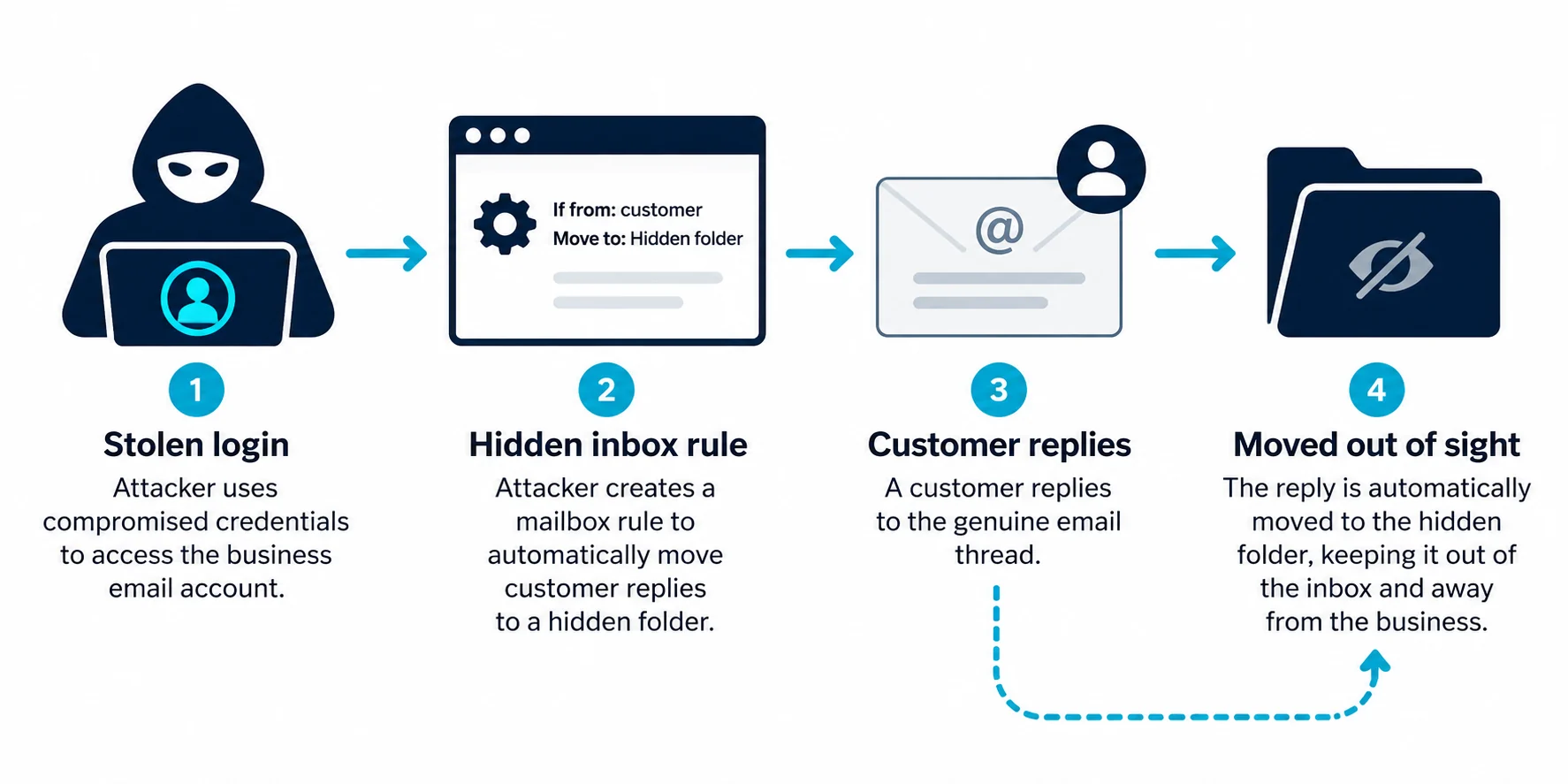
The criminal logs in quietly. They don't change your password, because then you'd notice. They set up a hidden rule that tucks certain emails out of sight. They read your invoices and wait. Weeks later, at exactly the right moment, they send one perfectly timed email asking a customer to pay a new bank account.
So when you're looking for signs your business email has been hacked, the loud ones matter, but the quiet ones matter more. This guide covers both: the twelve signs to check for, the five-minute health check you can run today, and exactly what to do if you find something.
Why Criminals Want Your Email (It's Not Spam Any More)
A business mailbox is valuable because of what it can see and who trusts it:
- Invoices, amounts and payment dates
- Who your customers and suppliers are
- How you write and sign off
- Password reset emails for other accounts
- Ongoing threads they can hijack convincingly
The goal is usually money, typically by redirecting a payment. And to do that, they need to stay hidden for as long as possible.
The Loud Signs (You'll Probably Notice These)
1. Contacts receive emails you didn't send
Customers or colleagues reply to messages you never wrote, or ask "did you mean to send this?"
2. Unexpected bounce messages pile up
Lots of "undeliverable" notices could mean your account sent a mass mailing. (Or it could be backscatter from someone forging your address. Check Sent Items to tell the difference. See someone is sending emails from my domain.)
3. Your password suddenly stops working
Someone may have changed it. Use your provider's recovery process immediately.
4. Your account is blocked from sending
Providers often block accounts that suddenly send lots of spam. See what to do if your email account is blocked from sending.
The Quiet Signs (Criminals Hope You Won't Check These)
5. Inbox rules you didn't create
This is the big one. Criminals often create rules that:
- Move replies from a specific customer to an obscure folder (like RSS Feeds, Archive or Conversation History)
- Mark certain messages as read so you don't notice them
- Delete messages containing words like "invoice", "payment", "bank" or "fraud"
- Forward copies of certain emails to an outside address
Check your rules in your email settings. Delete anything you don't recognise, but take a screenshot first, because it's evidence.
6. Forwarding to an address you don't recognise
Mailbox-level forwarding sends a copy of everything to someone else. It's easy to miss because your email keeps working normally.
7. Sent or deleted items you don't recognise
Criminals often send fraudulent emails and then delete them from Sent Items. Check Deleted Items too.
8. Sign-ins from unusual places or devices
Most business email providers show recent sign-in activity. Look for unfamiliar locations, times or devices.
9. Unexpected two-factor prompts
If you get login approval requests you didn't trigger, someone may have your password and be trying to get past your second factor. Never approve a prompt you didn't start.
10. New connected apps or permissions
Some attacks trick users into granting an app access to their mailbox. That access can survive a password change. Check which apps have access to your account.
11. Missing emails you were expecting
A customer says they replied, but you never saw it. A hidden rule might be moving or deleting it.
12. Changes to your signature, display name or reply-to settings
Subtle changes can redirect replies to the criminal.
The Five-Minute Email Health Check
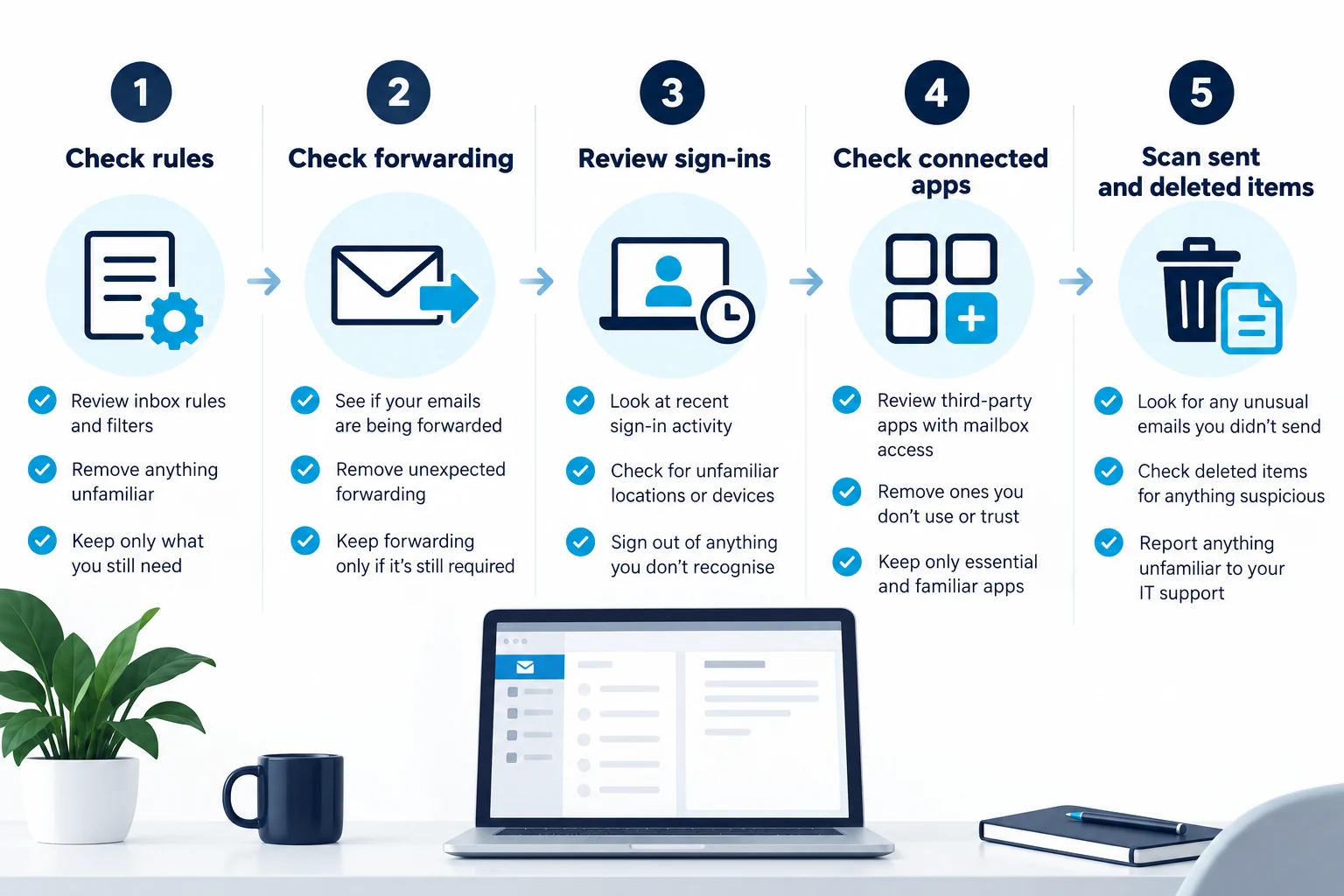
Run this today, even if nothing seems wrong:
- Open your inbox rules. Any you don't recognise?
- Check forwarding settings. Is mail forwarded anywhere?
- Look at recent sign-in activity. Anything unfamiliar?
- Check connected apps and delegates. Anyone or anything you didn't add?
- Scan Sent and Deleted Items for the last few weeks
Do it for every mailbox that handles money: finance, directors, accounts@ and anyone who sends invoices.
If you use Microsoft 365 or Google Workspace, your administrator can check these across all users from the admin console, which is far quicker than checking each mailbox individually.
If You Find Something: Act in This Order
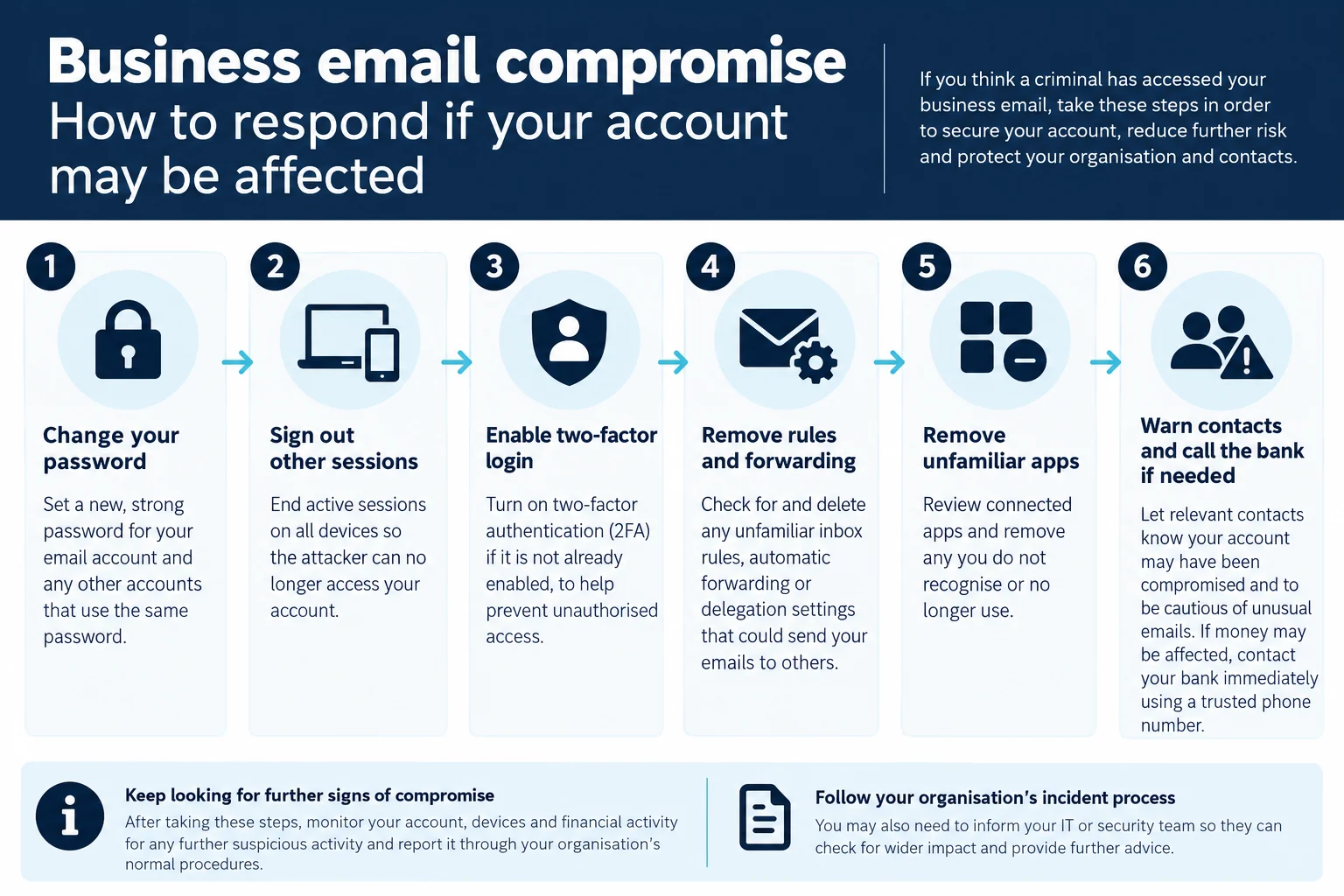
- Change the password to a strong, unique one
- Sign out of all sessions (most providers have an option to do this)
- Turn on two-factor login if it isn't already on
- Remove unfamiliar rules and forwarding (screenshot them first)
- Remove unfamiliar connected apps and delegates
- Check other accounts that used the same password, and change them
- Warn contacts, especially customers and suppliers who pay or are paid by you
- Tell your IT provider, and look for signs of compromise in other mailboxes
- If money may have been redirected, call your bank immediately and report to Action Fraud
Warn Your Contacts the Right Way
Send a short, clear message from the cleaned-up account (or another trusted channel):
Subject: Please disregard recent unusual emails from us

Our email account was accessed without permission recently. If you
received any requests from us to change bank details or make an
urgent payment, please do not act on them. Call us on [known number]
to confirm anything payment-related.

We have secured the account and apologise for any concern.
Prioritise customers who were due to pay you, and suppliers you were due to pay.
Why DMARC and Spam Filters Don't Catch This
It's natural to wonder why your email security didn't stop it.
SPF, DKIM and DMARC check whether an email genuinely came from your domain's authorised systems. When a criminal logs into your real mailbox, every email they send really is from your authorised systems. So authentication passes.
That's not a flaw in DMARC. It's simply the wrong tool for this job. Preventing account takeover is about:
- Strong, unique passwords
- Two-factor login on every account
- Phishing awareness
- Monitoring for unusual rules, forwarding and sign-ins
DMARC still matters, because it stops criminals faking your domain without hacking you. You need both. See what is DMARC?
How Most Business Email Accounts Get Hacked
Knowing how it happens helps you prevent it:
- Phishing emails that lead to a fake login page
- Reused passwords leaked from another website
- No two-factor login, so a stolen password is all it takes
- Approving a two-factor prompt you didn't trigger
- Granting a malicious app access to your mailbox
- Shared logins that nobody changes when people leave
The single most effective protection for a small business is turning on two-factor login for every mailbox. The NCSC's guidance on phishing has more on spotting and handling suspicious emails.
A Worked Example: The Rule Nobody Noticed
A fictional Cardiff design agency's office manager has her password stolen through a fake "shared document" email. Two-factor login isn't turned on.
The criminal logs in and creates one rule: any email from their largest client gets moved to the RSS Feeds folder and marked as read.
Three weeks later, the criminal emails the client, from the real account, asking them to pay the next invoice to a "new business account". The client replies with a question. The reply goes straight into RSS Feeds. The office manager never sees it.
The fraud is only discovered when the agency chases the "unpaid" invoice.
A five-minute rule check would have spotted it. Two-factor login would probably have prevented it entirely.
Where to Find Rules, Forwarding and Sign-In Activity
The exact menus change over time, but here's where to look in the two most common business email platforms:
- Microsoft 365 / Outlook: inbox rules and forwarding are in mail settings (in Outlook on the web, look in settings under Mail for Rules and Forwarding). Your account's security or sign-in activity page shows recent sign-ins. Admins can review users' forwarding and sign-ins from the Microsoft admin and security portals.
- Google Workspace / Gmail: filters and forwarding are in Gmail settings (Filters and Blocked Addresses, and Forwarding and POP/IMAP). Your Google Account's security page shows recent activity and connected apps. Admins can review activity from the Google Admin console.
If you can't find something, search your provider's help pages for "check inbox rules" or "check forwarding". If an IT provider manages your email, ask them to run the checks across every mailbox.
Making Two-Factor Login Actually Protect You
Turning on two-factor login is the most important single step. But how you use it matters:
- Prefer an authenticator app or security key over text messages where possible
- Never approve a prompt you didn't trigger, even if it keeps appearing (that's a sign someone has your password)
- Turn it on for every mailbox, including shared ones with logins, not just directors
- Make sure recovery options (backup codes, a second device) are set up, so people don't get locked out and switch it off in frustration
A Monthly Security Habit for Small Businesses
Set a recurring reminder:
[ ] Check inbox rules on finance and director mailboxes
[ ] Check forwarding settings
[ ] Review recent sign-ins for anything unusual
[ ] Review connected apps and delegates
[ ] Confirm two-factor is on for every account
[ ] Remove accounts for people who've left
[ ] Scan DMARC reports for unusual sending sources
Fifteen minutes a month. It catches most quiet compromises long before they turn into a stolen payment.
The Sign Most People Miss: Your Own Out-of-Office
Criminals sometimes check whether you're away (via your auto-reply) to time their fraud for when you're least likely to notice. They might also create an auto-reply on a compromised account so replies from suspicious customers get a reassuring automated response.
If you see an auto-reply on your account that you didn't set up, treat it as a strong sign of compromise.
Shared Mailboxes and Generic Accounts Are Easy Targets
Mailboxes like info@ or accounts@ are sometimes set up as separate accounts with a shared password that several people know. That makes them:
- Harder to protect with two-factor login (people share the code or turn it off)
- Harder to audit (who logged in from where?)
- Less likely to have their password changed when someone leaves
Where possible, use proper shared mailboxes that staff access through their own accounts (both Microsoft 365 and Google Workspace support this), rather than shared logins.
What to Tell Your Team Today
A two-minute message to everyone:
Quick security reminder:
- Never approve a login prompt you didn't start.
- If you get an unexpected "shared document" or "voicemail" email
  asking you to log in, don't. Check with the sender another way.
- If a customer says they got a strange email from you, tell IT
  straight away.
- Any request to change bank details gets a phone call to a known
  number before anything is changed.
Short, specific and repeated every few months works better than a long annual training session nobody remembers.
If You're an IT Provider: Admin-Level Checks
Administrators can spot compromise across the whole organisation much faster than individual users:
- Review mailbox forwarding to external addresses across all users
- Review inbox rules that move, delete or forward messages
- Check sign-in logs for unusual locations and failed attempts
- Look for recently granted app permissions to mailbox data
- Check for users restricted from sending
- Enforce two-factor login organisation-wide
Many of these checks can be automated or alerted on in Microsoft 365 and Google Workspace admin tools.
Frequently Asked Questions
How can I tell if my business email has been hacked?
Check for unfamiliar inbox rules, forwarding, sign-ins, connected apps and sent or deleted emails you don't recognise. Contacts receiving emails you didn't send is another strong sign.
Will changing my password stop the hacker?
Not always. Remove unfamiliar rules, forwarding and connected apps, sign out of all sessions and turn on two-factor login too.
Why didn't DMARC stop the hacked account sending emails?
Because emails from a compromised account genuinely come from your authorised systems, so they pass authentication.
Should I tell my customers my email was hacked?
Yes, especially anyone who pays you or is paid by you. Warn them not to act on any payment change requests and to call you on a known number.
What's the best way to prevent email hacking?
Turn on two-factor login for every mailbox, use strong unique passwords, train staff to spot phishing and regularly check rules and forwarding.
Can a hacker read my email without changing anything?
Yes. A criminal who logs in can read emails silently. Forwarding rules and connected apps can also give ongoing access. That's why checking rules, forwarding and sign-ins matters.
How do I check if my email is being forwarded?
Look in your mailbox settings for forwarding options and in your inbox rules for any rule that forwards or redirects messages. Admins can check across all users.
Should I report a hacked business email account?
If fraud or financial loss is involved, report to Action Fraud. Tell your bank if payments may be affected, and consider whether data protection obligations apply.
What is an inbox rule and why do hackers use them?
A rule that automatically moves, forwards or deletes certain emails. Hackers use them to hide replies and warnings from you while they carry out fraud.
Do I need to tell the ICO if my email is hacked?
If personal data was exposed and there's a risk to people, you may need to report it. Check the ICO's guidance on personal data breaches or ask whoever handles data protection.
How do hackers get past two-factor login?
Common tricks include repeated login prompts (hoping you'll approve one) and fake login pages that capture codes in real time. Never approve prompts you didn't start.
Sources and further reading
Related reading
- Fake invoice email with changed bank details
- Someone is sending emails from my domain
- Email account blocked from sending